PES 6 Web Online: Browser Start & Setup Guide
The PSP edition of Pro Evolution Soccer 6 adapted for a browser. Choose commentary or a lighter start without it; the project documents keyboard, gamepad and touch controls.
By GameHub editorial · Content updated 2026-10-10 · Page checked 2026-10-10
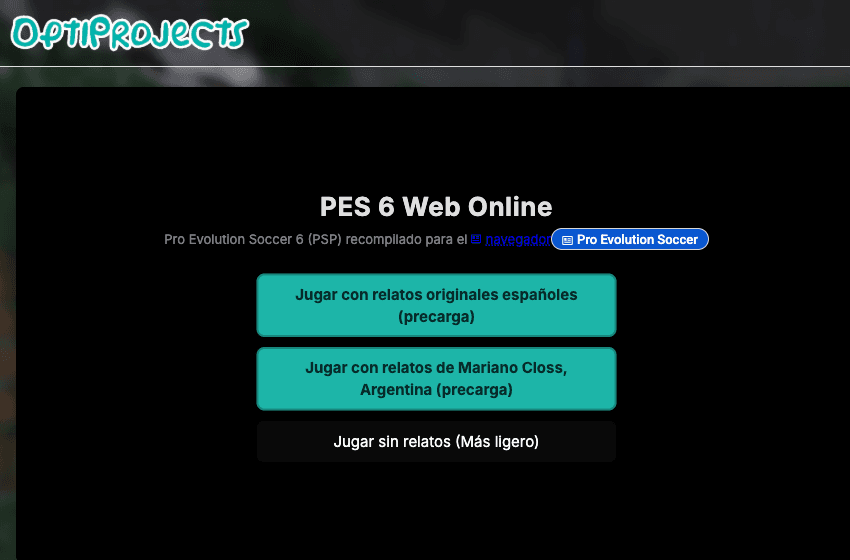 Start page capture
The project entry, news panel and three commentary/start options rendered. We closed the news panel and captured the launcher. No match, save import, account flow or mobile controls were tested.
Requirements and unknowns
What this project is
This is the PSP-based PES 6 Web Online project, not a PC-edition download. Its interface and help are primarily Spanish.
Where to start
Use the original project link above. The game runs on that site.
- Close the Novedades news panel with Cerrar if it covers the launcher.
- Choose a commentary option, or Jugar sin relatos (Más ligero) for the option without commentary.
- Use Controles for bindings and Gráficos for renderer and resolution settings.
Before troubleshooting
The project recommends a modern WebGL2 browser. Its help suggests 1x resolution and 30 FPS for slower devices. Online and save features were not tested by GameHub.
Our recorded observation
Desktop Tabbit / Chromium on macOS, 1280 × 800 viewport; entry-page inspection, not a mobile-device test. · 2026-10-10 · Level: page
- Open the project and close the visible Novedades panel with Cerrar.
- Inspect commentary/start options and project help; do not start a match.
Destination observed: https://pes6.optijuegos.net/. Access can change after a check; this is not a live status monitor.
Report a problemGo straight to the source.
- PES 6 Web Online original project Page observed: 2026-10-10