Radiant Optimizer
What it does. What’s free.
What to check before you pay.
Radiant Optimizer brings Windows tuning, game and app settings, and PC diagnostics into one application. This guide explains the maker’s offering so you can choose a starting point.
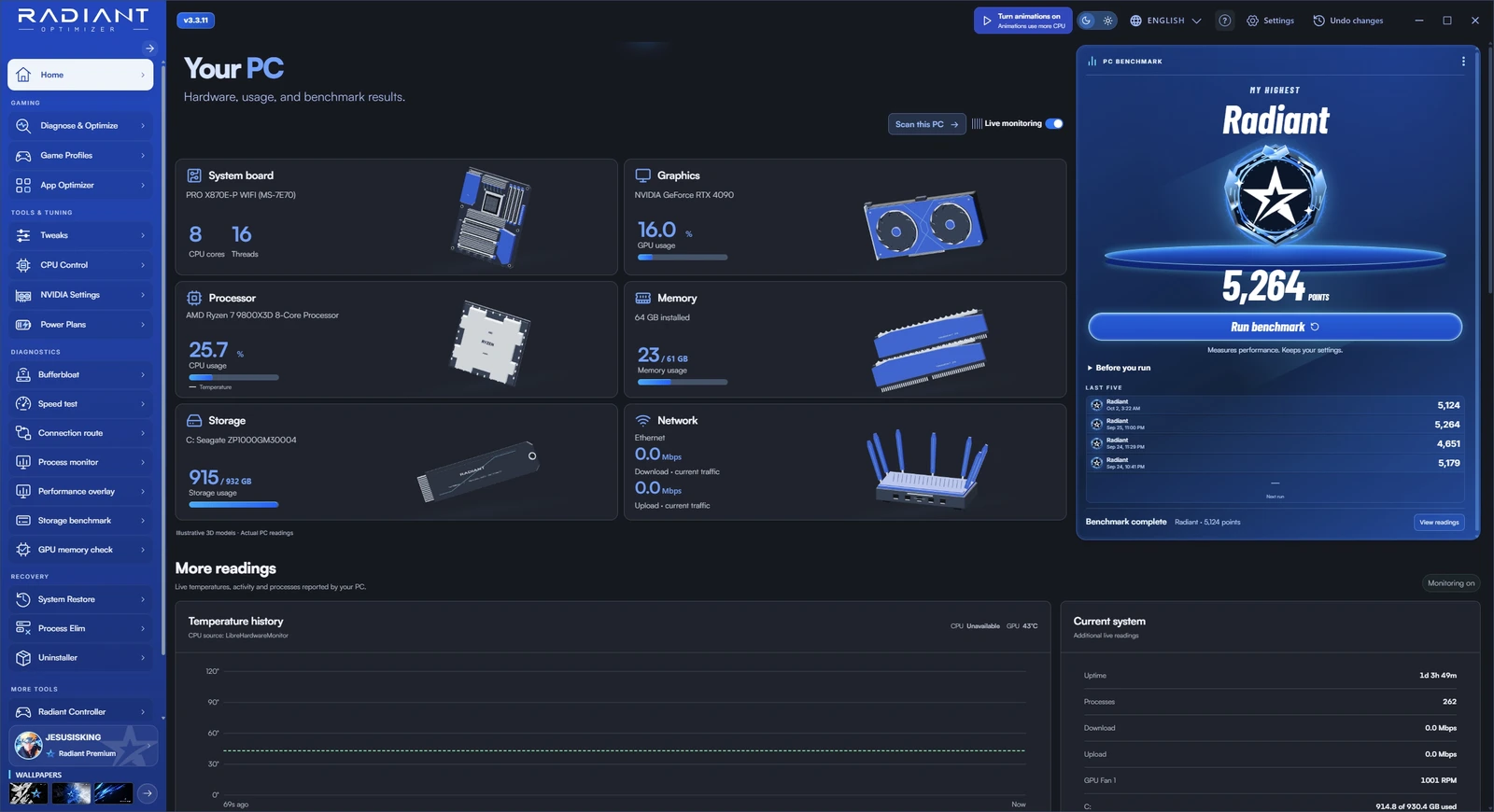
What does Radiant Optimizer do?
Choose a tool for a specific question, rather than applying every available setting. Availability below follows the maker’s feature page.
Windows tuning
Starter Windows settings, with additional CPU, NVIDIA and power-plan controls in Premium.
Ask first: Which setting are you changing, and can you compare its effect?
Game & app profiles
Supported game configurations and app settings. Some app profiles provide instructions rather than automatic changes.
Ask first: Is your exact game or app version supported?
Network checks
Speed and loaded-latency tests in Free; connection-route inspection in Premium.
Ask first: Does the delay appear only while your connection is busy?
Diagnostics & monitoring
FPS overlay, process activity, storage testing and a limited GPU-memory check.
Ask first: What will you measure before and after a change?
Recovery & utilities
PC scan and restore tools, plus expanded input, controller and removal utilities in Premium.
Ask first: What is the recovery path for the action you choose?
A tool is a starting point.
Consider a change only when you understand why it fits your problem. More enabled options are not a useful success measure.
Explore official features (opens in a new tab)Price, license & purchase conditions
$57.77USD / one-time
Premium is listed at $57.77 USD once for one PC. Product-lifetime updates exclude any separately priced major successor.
- One licensed PC
- No recurring subscription
- Updates for this product’s commercial lifespan
What does “lifetime” mean?
The terms tie access to the product’s commercial lifespan on the licensed PC. A major successor can require another purchase. Read this before treating “lifetime” as an unlimited upgrade promise.
License terms (opens in a new tab)Ask about a motherboard change
The terms say a replacement motherboard requires a new license; the refund page says support can arrange a transfer. These statements differ. Get the maker’s current answer for your situation before buying.
Ask official support (opens in a new tab)Read the refund policy first
The policy treats completed purchases as final, with discretionary review for duplicate charges, processing errors or unresolved technical issues. Try Free before paying and confirm the checkout total and current conditions.
Refund policy (opens in a new tab)Official download & a practical starting path
This is an editorial checklist based on the maker’s setup guide, not a walkthrough of an installation we performed.
- 01
Start at the official website
Use the official-site button below, then its Download Free action. We link to the maker instead of hosting an installer or an activation tool.
- 02
Identify the problem first
Write down the game, symptom and conditions. Inspect the dashboard or PC scan before deciding which setting is relevant.
- 03
Review one change at a time
Read the explanation, permissions and available recovery method. Save open work and keep a separate backup of important files.
- 04
Compare the same situation
Repeat the game scenario with comparable settings. Keep a record of the original values, the change and the outcome before trying another adjustment.
Will it improve FPS or reduce lag?
Our evidence status
We have not installed Radiant, benchmarked it, audited the installer or tested anti-cheat compatibility. The illustration and specifications above come from the maker. TabGameHub has no measured uplift, safety certification or star rating to offer.
Use a repeatable comparison
Pick one game scene and a clear symptom. Record a baseline, make one relevant change and repeat the same scene. If the result is unclear, investigate before adding more changes. This is a way to evaluate your own setup, not a prediction of improvement.
Separate network delay from rendering
The maker’s latency guide distinguishes transfer speed, delay under load and routing. A connection result from one destination does not establish the ping you will get in every game. Persistent problems may involve the router, provider or game server.
Network & latency guide (opens in a new tab)Who should start where?
Still identifying the issue? Start with a clear symptom and the free tools. A paid license is not a diagnosis.
Need a specific Premium tool? Confirm that it supports your setup and that you accept the license conditions.
Only want browser games? Skip the purchase decision and browse the Radiant Optimizer games or our full browser games list.
Checking a specific game first? Our Hood Warfare 2 guide lists that shooter’s published PC requirements, and the PS2 Web Recomp guide explains its WebGPU browser requirements.
Radiant Optimizer FAQ
What are the Radiant Optimizer games?
Radiant Optimizer is a Windows PC-optimization app, not a game. The “Radiant Optimizer games” people search for are browser games, such as Quake, Halo and PES 6 projects, that we list with original links on our separate Radiant Optimizer browser games page.
Is it Radian Optimizer or Radiant Optimizer?
The official name is Radiant Optimizer, from radiantoptimizer.com. “Radian optimizer” is a common misspelling of the same Windows app.
Is Radiant Optimizer free?
There is a free tier, separate from Premium. The maker’s refund policy describes it as available without an account, card or expiry. Compare the included tools above before deciding whether you need to pay.
Is Premium a subscription?
The current listing is a one-time payment for one PC. Check the Price & license section for the product-lifetime limitation and confirm the final checkout terms.
Where is the official Radiant Optimizer download?
Start at radiantoptimizer.com and use its Download Free link. TabGameHub does not host the installer, sell licenses or provide cracked versions.
Does Radiant Optimizer work on Mac or Linux?
The maker lists Windows 10 and 11. We have no verified native Mac or Linux support. A browser displaying the website does not establish that the Windows application can run on that device.
Will it increase FPS or lower ping?
We have no independent Radiant benchmarks. Treat any improvement as something to measure on your own setup. A Windows utility cannot control the entire route to a game server; connection-test results do not guarantee in-game ping.
Is Radiant Optimizer safe and compatible with anti-cheat?
TabGameHub has not audited its installer or tested anti-cheat compatibility. The maker’s terms describe Windows-only changes and acknowledge that third-party anti-cheat updates can affect compatibility. That is a manufacturer statement, not our safety certification.
Can I undo changes or get a refund?
Recovery depends on the action; do not assume every change is reversible. Completed purchases are generally final under the maker’s policy, with discretionary review of certain payment or unresolved technical issues. Read the linked policies before paying.
Do I need Radiant Optimizer to play the browser games?
TabGameHub requires no software purchase or TabGameHub account to browse its game links. Each external game controls its own setup requirements. Use our separate browser-game list if that is what you came to find.
Check the information at its source.
Official pages reviewed 2026-10-10. These are manufacturer sources, not independent performance evidence. Source dates and this guide’s update date are maintained separately. Official-site links are ordinary links with no affiliate code.
- Radiant Optimizer official website (opens in a new tab)Observed
- Official feature availability (opens in a new tab)Observed
- Official license terms (opens in a new tab)Observed
- Official refund and hardware-change policy (opens in a new tab)Observed
- Official support (opens in a new tab)Observed
- Official gaming PC setup guide (opens in a new tab)Observed
- Official network and latency guide (opens in a new tab)Observed