Web Dashers: Play the Geometry Dash Fan Mod
Web Dasher or Web Dashers is a fan-made browser mod of the Geometry Dash web demo with a level editor and online levels. How to play it, plus an FAQ.
By TabGameHub editorial · Content updated 2026-10-27 · Menu reached 2026-10-27
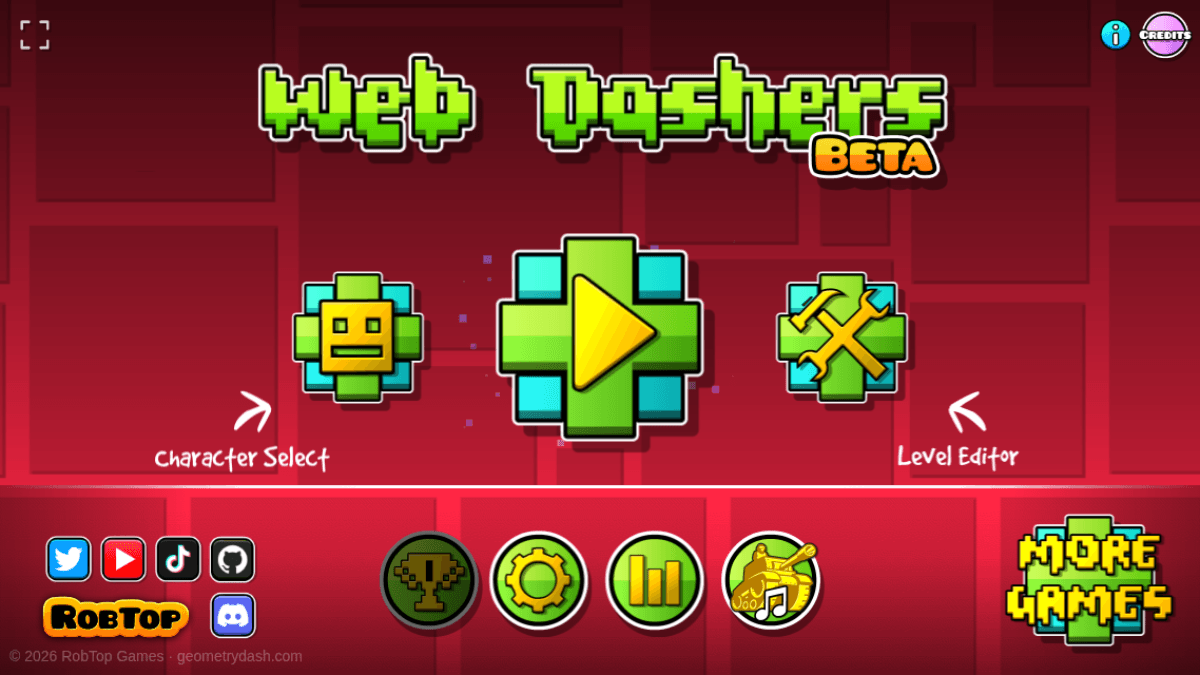 Menu capture
The original site loaded and reached its menu after about 25 seconds in our software-rendered browser. The title screen, the Level Editor hub, Featured, Search and the level select all opened, and the first level showed the cube, a spike and an attempt counter. The console showed a cross-origin error from the project’s online backend, and we did not log in, upload or rate anything. We did not finish a level, build one, or test a real graphics card, a phone or a gamepad.
Requirements and unknowns
What is Web Dashers (Web Dasher)?
Web Dashers, also searched as Web Dasher, is a fan-made browser mod of the Geometry Dash web demo. The project’s page describes the main levels, a built-in level creator and a level search for playing online levels, and says the project is actively in development.
It is not made by RobTop Games, the creator of Geometry Dash, and TabGameHub is independent of both. The title screen keeps the demo’s own footer, “© 2026 RobTop Games · geometrydash.com”, and its artwork belongs to RobTop Games. We link to the project’s own site and host no copy.
How to play Web Dashers
These steps follow what we saw on October 27, 2026. Our test browser used software graphics, so a real computer may load faster.
- Open the project’s site with the Play button on this page. It runs in the tab, with nothing to download.
- Wait for the menu. It took about 25 seconds in our software-rendered Chrome.
- Read the first dialog, headed “BETA (EXPECT BUGS)”, then close it.
- Press the big Play button on the title screen to open the level select. The first level in our check was Stereo Madness.
- Start a level. In ours we saw the cube, a spike and an Attempt counter.
- For icons, use Character Select on the title screen. For levels, open Level Editor.
Level editor, Featured and Search
The Level Editor button opens a hub of tiles. Four were active in our check, and the rest were greyed out.
The Featured tile lists online levels, and Search has a text box with quick-search buttons. The browser also logged a cross-origin error from the project’s online backend, and we did not log in, upload or rate anything, so we cannot say how well online levels work. We do not publish level counts or ratings, because we did not verify them.
What the project says it has
This comes from the README on GitHub, read on October 27, 2026, which says it was last updated on August 7, 2026. We did not test every item.
Other sites called Web Dashers
Several independent sites use the name. webdashers.net says RobTop did not make it, and webdashers.cc has a similar note saying it is separate from them. web-dashers.com embeds the original project and another game frame on its own page. We found no site at webdashers.com, which returned a not-found page.
We did not play these sites and do not link to them in the play button. Check the address before you type anything into a site, and use the original project’s site on this page.
Tips before you start
These are setup tips from our check, not level strategy, because we did not finish a level.
- Give the first load some time. Our software-rendered test took about 25 seconds to reach the menu.
- Expect bugs. The page itself says so, and the README lists unfinished features.
- Do not enter a password on any site just because it carries the Web Dashers name. We saw no need to sign in to open the menu, the editor hub or the first level.
Web Dashers questions, answered
Answers based on the project’s site and README as observed on October 27, 2026.
What our check covers
TabGameHub opened the project’s site on October 27, 2026 in headless Chrome and reached the menu, the editor hub, Featured, Search and the first level. We did not finish a level, build one, log in, upload or rate a level, or test a phone, a gamepad or a real graphics card. The feature list is the project’s own. It can change, so check the site for the current version.
If you like fan-made browser projects, see PokéSurvivor, Azeroth Survivors and Friday Fighters. For a two-player run on one keyboard, see Slope 2 player games.
Our recorded observation
Google Chrome 156 (headless) on Linux, 1200 × 730 window, software WebGL. No physical GPU, account, gamepad or touch screen. · 2026-10-27 · Level: menu
- Request web-dashers.github.io and check its headers and page text.
- Open it in Chrome, wait for the menu, and read the beta dialog and the title screen.
- Open the Level Editor hub and note which tiles are active. Open Featured and Search.
- Press Play, open Stereo Madness and watch the first seconds of the level.
- Read the project’s README and the console messages. Check the other sites that use the name.
Destination observed: https://web-dashers.github.io/. Access can change after a check; this is not a live status monitor.
Report a problemGo straight to the source.
- Web Dashers — the project’s own site on GitHub Pages Page observed: 2026-10-27
- Web Dashers on GitHub — README with the feature list and what is still in development Page observed: 2026-10-27
- webdashers.net — an independent site using the name Page observed: 2026-10-27
- webdashers.cc — an independent site using the name Page observed: 2026-10-27
- web-dashers.com — an independent site that embeds the original Page observed: 2026-10-27