Slope 2 Player Games: Tested Two-Player Picks
Slope 2 player games we loaded and played: two-player Slope variants on one keyboard, with controls, ads and original links. Local split screen only.
By TabGameHub editorial · Content updated 2026-10-27 · Gameplay checked 2026-10-27
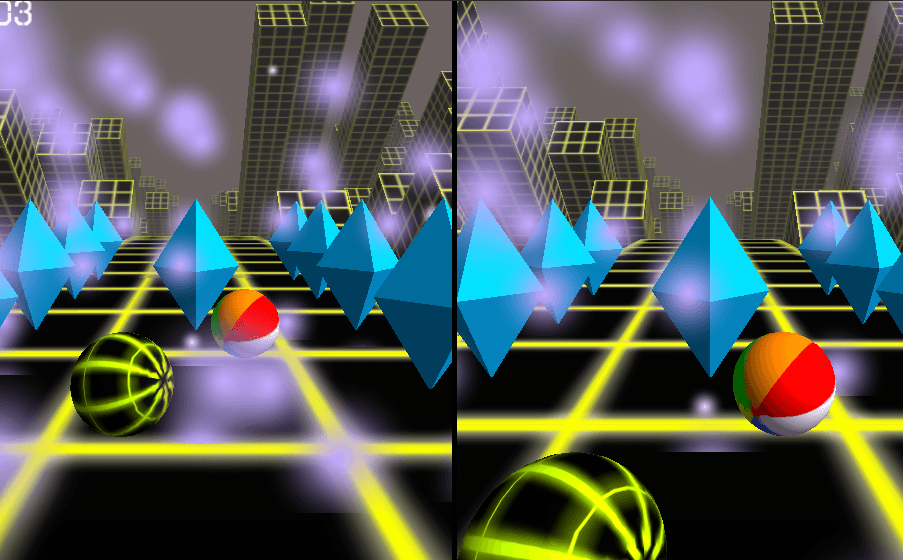 Gameplay capture
SilverGames and Funky Potato both loaded a Unity WebGL game with a split screen for two balls on one keyboard, and both showed a “PLAYER … WON” result after one player held a key and the run ended. The TwoPlayerGames.org page describes the same one-keyboard controls, and we reached its play screen. We did not play with two people, test touch controls or find an online lobby, and we did not play playslope.io or slopegamebox.com past their title screens.
Requirements and unknowns
What are Slope 2 player games?
Slope is a single-player game: one ball on an endless 3D track, steered left and right. Slope 2 player games are two-player variants. In the ones we tested, two balls race on a vertical split screen from one keyboard. TwoPlayerGames.org says the first to fall loses the round.
This page lists the variants we loaded and played on October 27, 2026. We name only what we saw, and we have not identified who made any of them. None is the original Slope, and none is made by TabGameHub. We link to the host sites and host nothing.
Two-player Slope games we tested
Both of the first two games loaded and gave a two-player split screen. The third is the page for the game that appears inside the Funky Potato version.
How to start a two-player Slope game
These steps match SilverGames, the link on this page. The other two work the same way with their own button names.
- Open SilverGames with the Play button on this page. It opens in a new tab, because the site cannot be embedded elsewhere.
- Press Play Now and wait for the “SLOPE 2 PLAYERS” title screen.
- Choose 2 PLAYERS. A vertical split screen appears with one ball per half.
- Player 1 steers with A and D. Player 2 steers with the left and right arrow keys.
- When one ball falls, a result such as “PLAYER 2 WON” appears with RESTART and MAIN MENU buttons.
- On Funky Potato, choose 2P PLAY instead, with Player 1 on WASD.
Same game, different names
SilverGames’ Slope 2 Players and Funky Potato’s Slope Multiplayer, which says Two Ball 3D inside, have the same menu and look: a neon-city track, cyan diamonds, one-player and two-player buttons, a Shop and a split screen. They look like one game under two names. We did not trace who made it, and we make no claim about that.
Two other sites, playslope.io and slopegamebox.com, show the same “SLOPE 2 PLAYERS” title screen with 1 PLAYER, 2 PLAYERS and SHOP. We saw those title screens but did not play them. We do not recommend them over the links here.
Before you start
Setup tips from our check. We did not test with two people at one keyboard.
- Sit side by side. Both players use one keyboard, one on A and D (or WASD) and one on the arrows.
- Expect ads. Funky Potato’s page loads them, and TwoPlayerGames.org asks you to watch one before play.
- Do not look for an online lobby. We found none, so you need the second player next to you.
- Ignore the Shop for a first game. We did not open it, so we cannot say what it sells or costs.
Slope 2 player questions, answered
Answers based on our check on October 27, 2026.
What our check covers
TabGameHub loaded SilverGames and Funky Potato in headless Chrome on October 27, 2026, started a two-player game on each and watched it end with a result screen. We read the TwoPlayerGames.org page and reached its play screen. We did not play with two people, test touch controls, open the Shop or find an online mode. Developers and release dates are not stated here, because we could not verify them.
Looking for another fan-made browser project? See Web Dashers, a Geometry Dash fan mod, or the fan-made fighting games Friday Fighters and Martin: No Filter Fighters.
Our recorded observation
Google Chrome 156 (headless) on Linux, software WebGL, one keyboard. No physical GPU, gamepad, touch screen or second player. · 2026-10-27 · Level: gameplay
- Open the SilverGames Slope 2 Player page, check its headers and press Play Now.
- Choose 2 PLAYERS on the in-game menu, hold one player’s key and watch the split screen until a result appears.
- Do the same on the Funky Potato Slope Multiplayer page with 2P PLAY.
- Open the TwoPlayerGames.org Two Ball 3D page and read its controls, then open the other sites that carry the same title screen.
Destination observed: https://www.silvergames.com/en/slope-2-player. Access can change after a check; this is not a live status monitor.
Report a problemGo straight to the source.
- SilverGames — Slope 2 Player (play page and in-game menu) Page observed: 2026-10-27
- Funky Potato — Slope Multiplayer (play page and in-game menu) Page observed: 2026-10-27
- TwoPlayerGames.org — Two Ball 3D (play page) Page observed: 2026-10-27
- Y8 — Slope, the single-player game Page observed: 2026-10-27
- playslope.io — Slope 2 Multiplayer (title screen seen, not played) Page observed: 2026-10-27
- slopegamebox.com — Slope 2 Player (title screen seen, not played) Page observed: 2026-10-27