PS2 Web Recomp guide
Your own disc.
A local browser build.
Explore PS2 Web Recomp, its documented games, WebGPU requirements and official local setup workflow. Build from your own disc image; no hosted games.
Sourced, with clear limits. Based on the project’s README, checked October 16, 2026. GameHub has not compiled a game, tested gameplay or benchmarked this runtime. The setup below summarizes the maintainer’s instructions.
What is PS2 Web Recomp?
PS2 Web Recomp is snuri00’s open-source project for turning a PlayStation 2 game’s executable into a locally built browser application. It translates the Emotion Engine CPU code ahead of time into C++, then compiles it to WebAssembly. Graphics are drawn through WebGPU.
This is an experimental porting workflow, not a ready-made PS2 game library. You provide a disc image of a game you own, prepare the build tools and run the project’s scripts on your computer. The result is a local web page for that game.
Read official sourceCan you play PS2 Web Recomp online?
You play the generated page in a browser after building and serving it locally. GameHub does not provide a Play button, a disc upload or a prebuilt game download for this project. If you want an immediate browser game, the directory link at the end of this guide offers a different starting point.
The upstream README asks users to keep generated game C++ and WebAssembly on their own machines and not publish them. The runtime’s MIT license does not grant permission to distribute translated commercial game code. Its hosting notes also warn that anyone who can reach your server can load the game; keep the build private.
Read official sourcePS2 Web Recomp games: what has been demonstrated?
At our October 16 source check, the README describes two games brought up through this workflow. These are maintainer-reported milestones, not GameHub play tests or full-game completion checks. Disc versions, hardware and browser conditions matter.
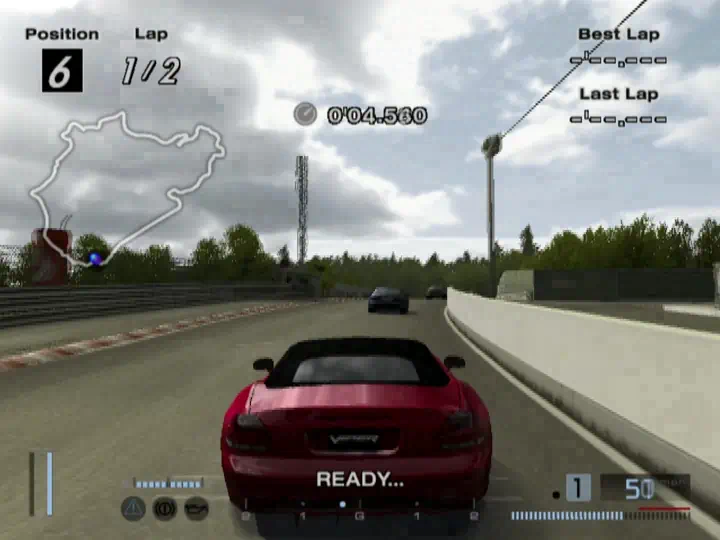
- Gran Turismo 4
- The maintainer describes boot, opening video, menus, races, audio and browser memory-card saves. The published example uses the PAL release; it does not prove every regional version works.
- God of War II
- The maintainer describes progress from menus and cutscenes into combat after generic runtime fixes. This does not establish a bug-free playthrough or support for the first God of War.
- Other PS2 games
- Unverified here. Upstream expects new games to encounter missing system calls, IOP library functions or graphics features. A generated build is not proof that a game is playable.
PS2 Web Recomp requirements: build machine vs browser
Building a game and opening its resulting page are separate tasks. A Windows browser with WebGPU does not establish that the documented build scripts work natively on Windows. The checked README describes Linux x86-64 and Apple silicon macOS for the build workflow.
Treat the checklist as prerequisites rather than an FPS guarantee. GameHub has not verified phone performance, Safari or Firefox behavior, Steam Deck gameplay or a PS5 workflow. On-screen phone controls mentioned upstream do not establish practical mobile performance.
| Requirement | Needed | What to check |
|---|---|---|
| Build computer | Linux x86-64 or Apple silicon macOS | The maintainer reports Linux runs and macOS script builds. A native Windows build workflow is not established by the checked README. |
| Build tools | Git, CMake, Ninja, C++20 compiler, Python 3 | Clang is preferred. macOS needs a newer Bash than the system 3.2; 7-Zip is needed for .7z archives. |
| Web compiler | Emscripten SDK | The first browser build installs it in tools/emsdk, or uses the SDK selected by EMSDK. |
| Game input | A disc image of a game you own | The port script accepts an ISO, or a ZIP / 7z archive containing an ISO. The repository supplies no game data. |
| Storage | About 300 MB per game, plus its disc image | Upstream estimate for generated code and builds; not a measured download size or a guaranteed maximum. |
| Browser graphics | WebGPU with a usable GPU adapter | The README describes Chrome / Edge on Windows and macOS, with extra configuration on Linux. API support alone does not verify gameplay. |
| Local server | HTTP Range support and cross-origin isolation | Use the supplied serve.py. SharedArrayBuffer threads require COOP / COEP response headers. |
How to build and run PS2 Web Recomp locally
The following is the maintainer’s command sequence, not an installation we performed. Install the prerequisites first. Replace My Game.iso with the path to your own disc image; mygame is the example directory name used consistently by the port and server commands.
The first web build can download compiler dependencies. The script translates the game executable, performs headless discovery runs to find more code entry points and builds the browser output. A new title can still fail on missing runtime features. Build time depends on your machine and the game.
git clone https://github.com/snuri00/ps2-web-recomp.git
cd ps2-web-recomp
scripts/port.sh mygame "My Game.iso"
python3 scripts/serve.py build/web-mygame games/mygame/disc.iso- Confirm that your build computer has the tools in the requirements table and that you have your own game image.
- Clone the original repository and run port.sh with your chosen directory name and quoted image path.
- After a successful build, start the supplied local server using the matching build and game directories.
- Open http://localhost:8620/ in your browser. Check startup and an actual gameplay scene separately; a rendered menu does not verify the game.
- Export a memory-card backup before changing the build, browser profile or address you play from.
WebGPU, SharedArrayBuffer and startup problems
Upstream describes Chrome and Edge WebGPU support on Windows and macOS. For Linux, the checked instructions mention enabling WebGPU and Vulkan through browser flags and restarting. Browser support changes, so follow the current README and the local page’s adapter message for your exact environment.
Separate an environment failure from a game-specific runtime gap. If the local server works and the game still stops, collect the exact error and check upstream issues before rebuilding repeatedly. The symptoms below are documented clues, not fixes GameHub has reproduced.
- No usable WebGPU adapter
- Check the browser, GPU and upstream browser notes. The software-rendering fallback is described as adequate for menus but too slow for 3D play.
- Thread / SharedArrayBuffer error
- Use the supplied HTTP server instead of double-clicking the HTML file. Upstream requires Cross-Origin-Opener-Policy: same-origin and Cross-Origin-Embedder-Policy: require-corp.
- [sys] unhandled syscall
- The game has reached a system call the runtime does not implement. Browser graphics settings alone do not resolve that missing feature.
- [iop] missing <library> #<n>
- An IOP library function is missing. Record the title, disc version and log when checking the project’s current issue tracker.
Keyboard controls and gamepads
The README provides these browser keyboard mappings. Gamepads use the browser’s Gamepad API; pressure-sensitive triggers and vibration depend on the controller and browser. GameHub has not tested a controller with this runtime.
- Face buttons
- Z = Cross; X = Circle; A = Square; S = Triangle.
- Shoulder buttons
- Q, W, 1 and 2 are assigned to the shoulders upstream.
- Start / Select
- Enter / Backspace.
- Movement
- Arrow keys = D-pad; I, J, K and L = left stick.
- Display
- F toggles fullscreen. Changing the resolution selector reloads the page.
Memory-card saves: import, export and backups
Upstream says the page supplies a memory card in slot 1 and retains it in browser storage for the address you play from. A normal reload can retain progress, but that does not make browser storage a permanent backup. Before clearing site data or moving to another browser, export the card.
Export card produces a .ps2 file in the memory-card layout used by PCSX2; Import card loads a card into the slot. The project describes transferring cards between browsers or bringing one from PCSX2. GameHub has not verified a particular save file, game region or import result.
Read official sourceIs PS2 Web Recomp an emulator?
Partly. Its main CPU code is translated before play, while a runtime still emulates the console’s remaining services and hardware. Describing it as requiring no emulation at all would hide a substantial part of how it works.
For a player, the practical distinction is preparation: this project creates a build for your game on your machine, rather than offering a general browser page that accepts any supported disc and starts immediately. Verify the repository owner snuri00 when following similarly named projects or download pages.
Read official sourcePS2 Web Recomp FAQ
Where is the official PS2 Web Recomp download?
The original source is snuri00/ps2-web-recomp on GitHub. Follow its local build instructions with your own disc image. GameHub provides an official-source link, not a prebuilt game or ISO download.
Is PS2 Web Recomp free?
The project’s original runtime and recompiler code are available under the MIT license, with third-party notices retained. Game ownership and permission to distribute generated game code are separate from that license.
Which games does PS2 Web Recomp support?
The README checked October 16, 2026 describes Gran Turismo 4 and God of War II. Those are maintainer-reported progress examples, not a complete compatibility list or GameHub-tested playthroughs.
Can I play PS2 Web Recomp games on this website?
No. Build the project locally from a game image you own and open the result through its local server. This guide does not host or accept game files.
Does PS2 Web Recomp work on Windows?
Upstream describes Chrome and Edge on Windows for the browser runtime. Its documented build workflow uses Linux x86-64 or Apple silicon macOS; the checked README does not establish a native Windows build procedure.
Can I run PS2 Web Recomp on a Mac?
The maintainer says the scripts build on Apple silicon macOS with a newer Bash and the required tools. GameHub has not compiled or played a game on macOS, and this does not establish Intel Mac support.
Does PS2 Web Recomp work on phones or PS5?
The README mentions on-screen phone controls, but GameHub has not verified mobile gameplay or performance. The checked instructions do not establish a PS5 workflow.
Why is my PS2 Web Recomp game not working?
Check the local server and browser prerequisites first, then the exact runtime log. Missing syscalls, IOP functions and graphics features can stop unported titles even when a build succeeds.
Check the original.
- PS2 Web Recomp — original project and README Source observed: 2026-10-16
- Official local build instructions Source observed: 2026-10-16
- Official browser requirements and controls Source observed: 2026-10-16
- Official memory-card import and export notes Source observed: 2026-10-16
- Official local server and isolation requirements Source observed: 2026-10-16
- Official game-file and generated-build restrictions Source observed: 2026-10-16
- Maintainer’s Gran Turismo 4 demo image Source observed: 2026-10-16
GameHub is an independent guide, unaffiliated with the project, Sony or the game publishers. Check the original repository for changes and current issues. Send a correction if information on this guide changes.