PokéBonk Game Guide: Builds and Tier List
PokéBonk game guide: starters, build plan, fusions, controls and why there is no tier list here, from our own check of the free 3D Pokémon survivor game.
By TabGameHub editorial · Content updated 2026-10-27 · Menu reached 2026-10-27
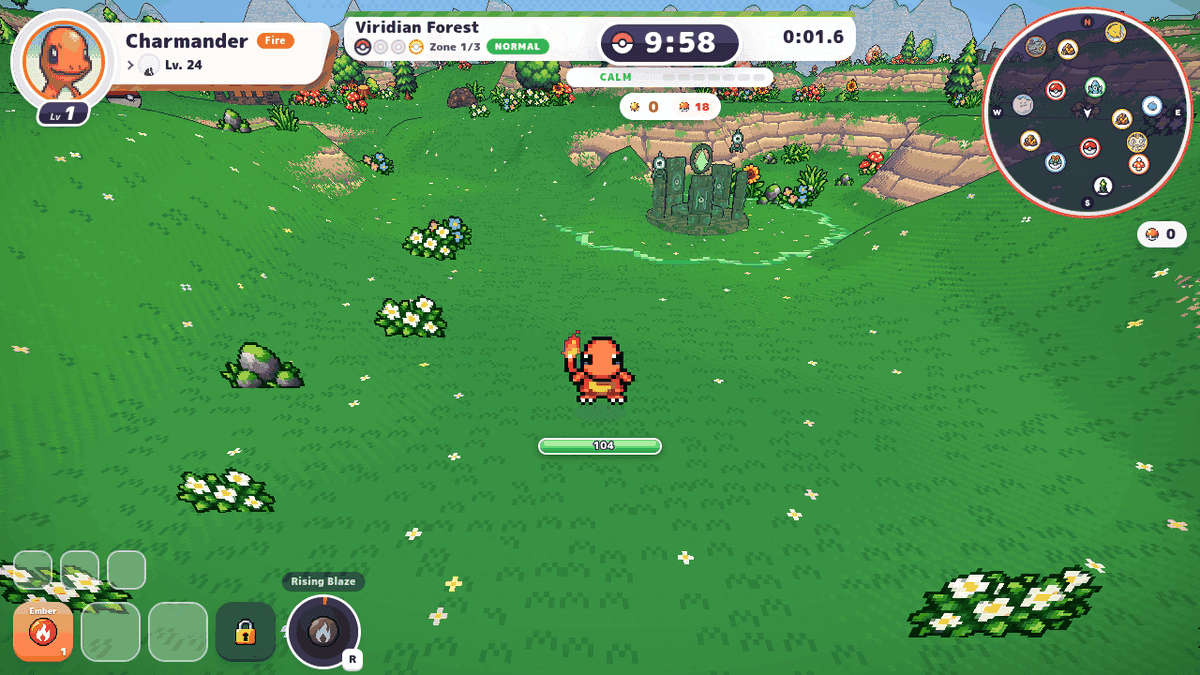 Menu capture
The game’s menus, starter choice, League, build plan, prepare-run screen, the in-run screen, pause screens and settings all opened. The game ran at about 1.6 frames per second on this machine with software WebGL, and the game itself warned that it was not using a graphics card. We did not fight, level up, meet a boss, use the shop, capture a Pokémon or test a phone, a gamepad or a real graphics card.
Requirements and unknowns
What is PokéBonk?
PokéBonk is a free 3D Pokémon survivor fan game in the browser. The footer credits the game to Charcher and says it is unofficial, non-profit and has no ads, purchases or donations. It is not affiliated with, sponsored by or endorsed by Nintendo, The Pokémon Company, Creatures Inc. or GAME FREAK inc. The sprites are from PMD SpriteCollab under a Creative Commons license.
We link to the game’s own page on pokebonk.com. It cannot be embedded on other sites: the response headers say frame-ancestors self and x-frame-options SAMEORIGIN, so the play button on this page opens it in a new tab. We host no copy.
This is the pokebonk game page on TabGameHub. If you are looking for PokéSurvivor, that is a different game with its own page: PokéSurvivor.
How to start playing
These steps follow our guest-account test on October 27, 2026.
- Open pokebonk.com with the Play button on this page.
- Press Play as a guest. The game says your progress is saved on the server, tied to this device. A “Verify you are human” check ran and passed on its own after about 15 to 20 seconds in our test.
- Choose your partner from Bulbasaur, Charmander or Squirtle. The confirmation says you cannot change it later, and the other two join later.
- Press Play on the main menu. Choose the region, mode and difficulty, then start the run. The screen lists the arrow keys for region and difficulty and Enter to start.
- On our guest account, only Viridian Forest and Normal difficulty were open. The other three regions and Hard and Nightmare difficulties were locked.
The three starting partners
We opened Charmander’s League page in full. The other two starters showed only the choice screen, so these are the game’s own descriptions.
PokéBonk builds: what the game itself lets you plan
The League page has a Plan button that opens a build plan for that Pokémon. It has four sections: attacks (up to six), vitamins (up to five), fusions (up to three) and items. For Charmander the plan was empty and showed a list of attacks to pick from. We did not fill a plan or see how a plan is used in a run.
Attacks come from several pools. Your starter’s kit moves are its four signature attacks, which come up more often than any other, each from its own level. On level-up there is a 35% chance one of your evolution-line moves is offered at random, if you have a free slot. When you evolve, your evolution form’s moves become available. Other members of your League who share a type with your starter teach it their attacks of that type or of Normal type.
The game says vitamins are chosen when you level up, items come from Poké Balls on the map or from Meowth, and you charge an Unown altar by standing inside it to choose a blessing. We did not see any of these in action, so we have no tested advice.
Fusions happen in Bill’s Machine when both moves are at max level eight. The game lists your signature fusion, reaction fusions (for example, a Fire attack plus a Flying attack makes Fiery Gale), type fusions (for example, Fire plus Fire makes Scorching Sun) and a machine failure called MissingNo. for any other pair, which makes a random type’s fusion. We did not reach max-level moves, so we did not use Bill’s Machine.
PokéBonk tier list: why this page has none
There is no tier list from the developer that we found. We did not rank anything ourselves. Only three starters were visible on our guest account, and the other League slots showed question marks and padlocks, so we could not compare the full roster.
Other sites publish starter rankings from their own runs, and one of them itself says there is no official tier list. We did not verify those sites or reuse their numbers. This page will not name a best starter, and it publishes no best build, because we did not reach max-level moves or test the fusions.
Controls and settings
The default keys can be rebound in the settings. The aim mode can be set to Automatic, which targets the closest enemy, or Manual, which aims toward the camera. The game’s own settings say to connect a controller (Xbox, PlayStation or Switch) and press a button. We did not connect a controller. Auto Ultimate makes the Ultimate ability go off by itself when charged and enemies are near.
Run structure we saw
These are the menu and pause-screen descriptions from our check. We did not reach them in real combat.
PokéBonk questions, answered
Answers based on the game’s own site as observed on October 27, 2026.
What our check covers
TabGameHub opened pokebonk.com on October 27, 2026 in headless Chrome with software WebGL. We reached the menu, starter choice, League, build plan, the prepare-run screen, the in-run HUD, pause screens and settings. The game ran at about 1.6 frames per second on this machine and warned that it was not using a graphics card. We did not fight, level up, meet a boss, use the shop, capture a Pokémon or test a phone, a gamepad or a real graphics card.
The build plan, move pool, fusions and run structure are the game’s own descriptions, not tested results. We did not publish a best starter, a best build or a tier list.
If you like unofficial Pokémon survivors, see PokéSurvivor and TuffyMon. For another survivors-style game, see Azeroth Survivors.
Our recorded observation
Google Chrome (headless) on Linux, 1280 × 720 window, software WebGL. No physical GPU, guest account, keyboard only. · 2026-10-27 · Level: menu
- Open pokebonk.com and check the response headers for frame-ancestors and x-frame-options.
- Start as a guest, choose Charmander as the starter, and open the League page.
- Review the build plan screen and the prepare-run menu with region, mode and difficulty options.
- Start a Viridian Forest run on Normal and watch the first seconds with the in-run HUD.
- Open the pause screen, settings, move pool, fusions, controls and altars. Note the frame rate warning.
- Reload the page to see the run recovery screen. Read the footer.
Destination observed: https://pokebonk.com/?lang=en. Access can change after a check; this is not a live status monitor.
Report a problemGo straight to the source.
- PokéBonk — the game’s own site with menus, League, build plan, prepare-run, pause screens, settings and footer Page observed: 2026-10-27
- PokéBonk response headers — frame-ancestors self and x-frame-options SAMEORIGIN Page observed: 2026-10-27