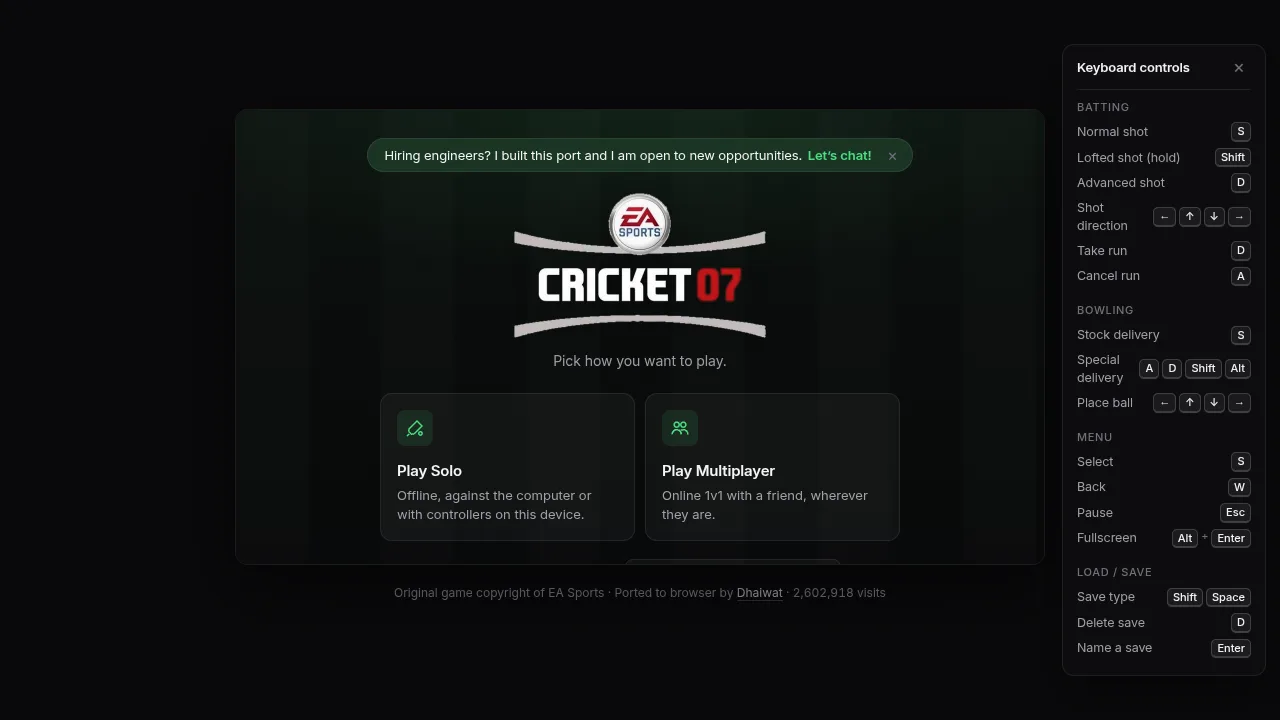
Reached the port's own Play Solo / Play Multiplayer menu after a real Lite download. The in-game EA front end never rendered: the canvas stayed on a blank "Loading the game data…" screen on our software-only WebGPU setup, so no in-game menu, match or online room was tested. Not tested: the Regular download, background videos, creating or joining a room, online play, controllers, phones, Safari and Firefox.
Requirements and unknowns
What is the Cricket 07 browser port?
The Cricket 07 browser port at cricket07.dhaiwat.com is an unofficial version of EA Sports Cricket 07 by developer Dhaiwat Pandya. The game's Windows program is recompiled to WebAssembly and WebGPU rather than emulated, so it runs in a desktop browser tab with solo play and online 1v1. EA has not licensed it. It launched in October 2026.
The original game came out in November 2006 for Windows and PlayStation 2, made by HB Studios and EA Canada and published by EA Sports. It uses the Century Stick batting system, has Richie Benaud and Mark Nicholas on commentary, and includes Ashes modes plus 50, 20, 10 and 5-over matches and Tests. Only Australia, England, South Africa and New Zealand have licensed player names.
TabGameHub links to the port and does not host it. For another classic sports game with a commentary or no-commentary choice, see PES 6 Web Online. More titles like this are in Sports browser games and Classic PC and console games.
How to play Cricket 07 in your browser
These steps follow the port's own page. We completed steps 1 to 4 up to the port's menu in desktop Chrome on November 1, 2026 using Lite; the in-game screens did not render on our machine (see Sources and our check).
- Open cricket07.dhaiwat.com in desktop Chrome or Edge.
- Pick Regular (740 MB) or Lite (438 MB) and wait for the download to finish. Keep the tab open.
- At "Pick how you want to play", choose Play Solo or Play Multiplayer.
- Use the arrow keys to move and S to select, or a controller.
- Press Alt + Enter (⌥ + Enter on Mac) or use the corner button for fullscreen.
Regular vs Lite: download size and what you lose
The landing page shows 740 MB for Regular and 438 MB for Lite, and our Lite download matched the 438 MB label. The developer's file list (manifest version 24304fcb3499, read on November 1, 2026) adds up to the same compressed totals: 740.3 MB for Regular and 437.6 MB for Lite. Regular's 25 intro and broadcast videos download in the background after you can start, which is why its storage use keeps growing.
Regular is the whole game with commentary and the full soundtrack, like the commentary choice in PES 6 Web Online. Lite drops commentary and keeps one song. The page says you can upgrade Lite later.
The browser asks to keep the files from being evicted. If the page says "Not enough browser storage", free disk space and try again.
Cricket 07 online multiplayer: play 1v1 with a friend
Online play is 1v1 and uses lockstep netplay: only controller inputs travel between players, and the games compare memory checks to catch desync. Both players need the same build and the same game files, and each needs a keyboard or controller.
In our Chrome run, Play Multiplayer opened a screen with a name field, Host a game (a Create room button and a collapsible Server location), and Join a game. We did not create a room, so we did not see a room code, an invite link or the input-delay setting, and we did not play online. The steps below follow the port's page and README.
Which server for friends in India and Pakistan? Pick a region between you, such as Asia-Pacific or Southeast Asia, and leave input delay on Auto. This is general netplay advice, not something we measured.
- Choose Play Multiplayer and enter your name.
- Under Host a game, open Server location and pick a region, or leave Nearest to me.
- Click Create room and send the room code (or the invite link the page offers) to your friend.
- Your friend opens the same site, chooses Play Multiplayer, and enters the code under Join a game.
- Set input delay (Auto by default), then start the match.
Cricket 07 browser controls (keyboard and controller)
The keyboard table below comes from the port's help text. The menu screen we captured shows the same panel: arrows to move and S to select. We did not reach a match, so we have not tested how the keys feel in play.
The port also supports game controllers. The developer said at launch that he had not been able to test them yet, and we did not test one either. We did not reach the in-game menus, so we cannot confirm whether the mouse cursor works there.
Browsers, Mac, phones and controllers
Desktop Chrome and Edge are the recommended browsers. The page itself says "Use a current Chrome, Edge or Safari" when WebGPU is missing, while the developer advises Chrome for download errors because Safari does not work well. We tested only Chrome 156 on Linux.
Phones: the port's current page includes on-screen touch controls, an iPhone "Add to Home Screen" step (fullscreen only from the Home Screen) and an Android landscape lock, and its landing page warns that loading on a phone can take up to a minute. We have not tested a phone match. Older guides that say there are no touch controls predate this.
Cricket 07 not loading? Fixes
These fixes come from the port's own error messages and general browser behavior. We reproduced only the stalled loading screen described first.
Saves and browser storage
The port keeps the game files and your saves (tours, tournaments, matches) in your browser's private storage for that site, browser and profile. Clearing site data removes both. Online sessions use separate temporary saves. This comes from the port's own script notes; we did not test saving because we did not reach a match.
Is it official, safe and legal? Which site is the real one?
The developer's address is cricket07.dhaiwat.com, the link given in his X post and on the GitHub project. Sites such as cricket07.net and cricket-07.org run their own launchers and are not the developer's. Avoid APK or "unlocked" downloads.
The port is unofficial. The project code is MIT licensed, but EA owns Cricket 07 and has not licensed the port, and the GitHub build expects your own copy of the game. This is not legal advice. The developer's manifest lists his own file host, cricket07-files.dhaiwat.com, as the download source. We did not audit the code.
How Dhaiwat made Cricket 07 run in a browser
According to the [project README](https://github.com/Dhaiwat10/cricket07-browser), the Windows executable was statically recompiled to C (31,547 functions and about 1.3 million instructions, using Ghidra and a Python translator) and then compiled to WebAssembly with Emscripten. Direct3D 8 is rebuilt on WebGPU, DirectSound runs through Web Audio, and DirectInput through browser keyboard, mouse and gamepad. Nothing is emulated or streamed.
The lockstep netplay and controller code were adapted from Stephan Cilliers' Rugby 06 browser port. For other recompiled games in a tab, see our PS2 web recompilation guide and Need for Speed Underground 2, another 2000s EA classic that runs in a browser.
Other ways to play Cricket 07
You can play the original PC or PlayStation 2 release if you own a copy. A third-party desktop wrapper for Mac and Windows, udeshvirk/cricket07-desktop, says it is built on Dhaiwat's port; we have not tested it. You can also build the GitHub source yourself, which needs your own copy of the game files.
For more browser games, browse Sports browser games and Classic PC and console games.
Cricket 07 browser FAQ
Short answers, with what we tested and what we did not.
Sources and our check
On November 1, 2026 we opened cricket07.dhaiwat.com in desktop Chrome 156 on a machine with no GPU, downloaded Lite, and reached the port's menu. Play Solo then booted the game but stayed on a blank "Loading the game data…" canvas, so this is a menu-level check, not evidence of gameplay, online matches, Regular, controllers or phones. See how we check games for what each level means.
Sizes come from the developer's manifest and the labels we saw on the page. Controls come from the port's help text. Background on the port comes from the project README and the developer's X post, and on the original game from Wikipedia. The screenshot shows the port's own menu; the game is © EA.
Our recorded observation
Google Chrome 156 on Linux, 1280x720 window, run headless and then headful under a virtual display. The machine has no GPU: Chrome exposed WebGPU only through a software fallback adapter, and the page logged that the game would be slow. · 2026-11-01 · Level: menu
- Open cricket07.dhaiwat.com. The landing page showed Regular (740 MB) and Lite (438 MB) cards and needed no file picker.
- Choose Lite. The page downloaded the game (369 of 438 MB at the last progress reading) and finished in about 20 seconds.
- Reach the port's menu, "Pick how you want to play", with Play Solo and Play Multiplayer. Capture it.
- Open Play Multiplayer: a name field, Host a game (Create room button, collapsible Server location) and Join a game. We did not create a room.
- Choose Play Solo. The game booted and the page logged a 640x480 Direct3D 8 device, but the 853x480 canvas stayed blank white with "Loading the game data…" for more than 8 minutes headless and about 1 minute headful.
Destination observed: https://cricket07.dhaiwat.com/. Access can change after a check; this is not a live status monitor.
Report a problemGo straight to the source.
- Cricket 07 — Dhaiwat's browser port Page observed: 2026-11-01
- Dhaiwat10/cricket07-browser on GitHub (README and source) Page observed: 2026-11-01
- Cricket 07 port game manifest (file list and sizes) Page observed: 2026-11-01
- Dhaiwat on X: Cricket 07 with an online multiplayer mode Page observed: 2026-11-01
- Cricket 07 (Wikipedia) Page observed: 2026-11-01