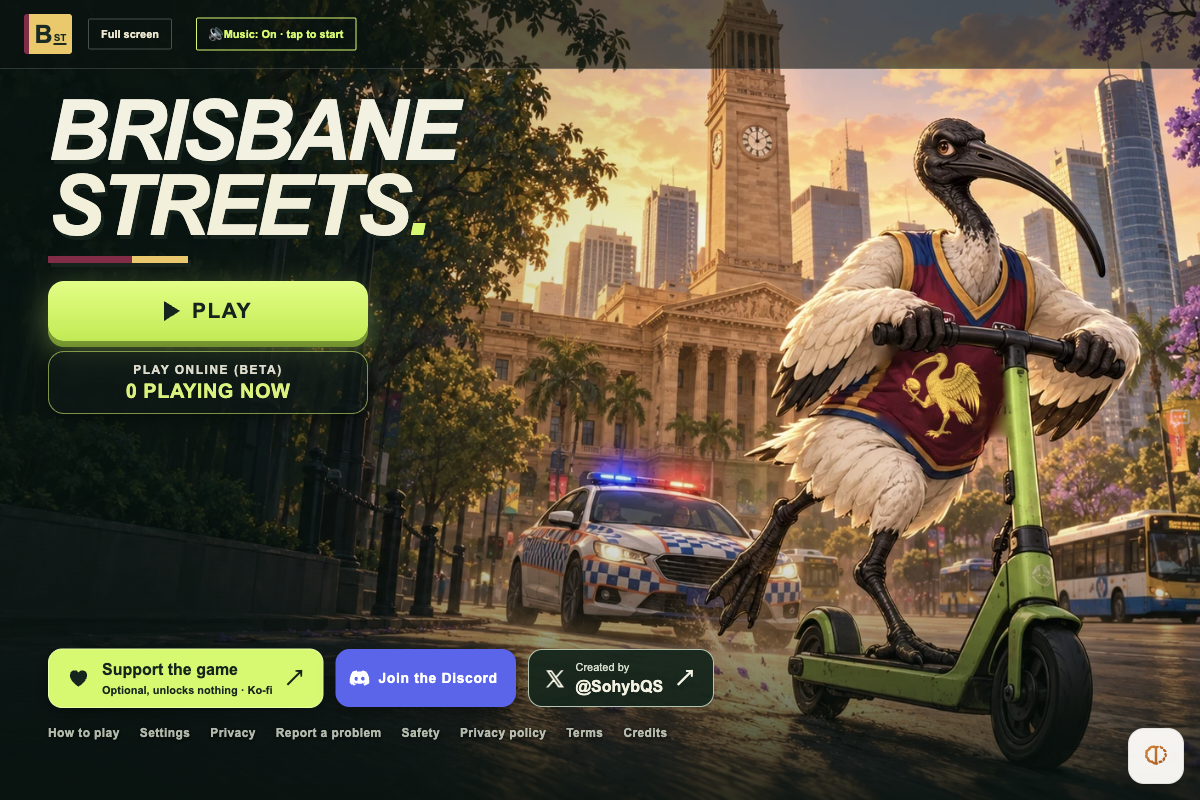
The full title screen, live player counter and complete How to play controls panel loaded without login or paywall. Clicking PLAY while the controls overlay remained open was blocked by that overlay in automation; live 3D city driving, AI NPC chats and Online (beta) rooms were not tested past the menu.
Requirements and unknowns
What is Brisbane Streets?
Brisbane Streets (at brisbane-streets.pages.dev) is a free browser open-world sandbox set in Brisbane, Queensland, created by solo developer @SohybQS. You roam the city around City Hall on foot, on green e-scooters, in cars, on buses or aboard a hovering Brisbane Metro while completing missions and evading the Queensland Police Service (QPS).
Unlike classic console ports that require your own game files, Brisbane Streets runs natively in the browser with no installer, no account and no ads. An optional Ko-fi support link explicitly unlocks nothing.
How to start Brisbane Streets in your browser
TabGameHub checked brisbane-streets.pages.dev on November 17, 2026 in desktop Chrome without signing in. Allow a short wait on first visit while the 3D assets download:
- Open brisbane-streets.pages.dev in a desktop browser and wait until the loading bar clears and the green PLAY button appears.
- Open Settings before starting if you want to switch between Performance, Balanced or Quality graphics or pick a frame-rate cap (30–144 FPS).
- Click PLAY for Solo mode (open to everyone, saves locally on your device) or PLAY ONLINE (BETA) to join or create a multiplayer room with a name and code (meant for ages 13+).
- Click inside the game view once loaded so mouse look locks cleanly, and review How to play for vehicle, Metro and combat keys.
Full desktop controls & police escalation
These bindings come directly from the official How to play panel at brisbane-streets.pages.dev on November 17, 2026:
Solo vs Online (beta) & privacy notes
According to the Terms of Use and Privacy Policy (updated October 30, 2026), solo saves and settings stay on your device, and you can toggle anonymous play-stat telemetry off from the title screen's Privacy box. Note that solo play includes simulated violence and strong language.
Online (beta) uses Cloudflare Turnstile anti-bot protection and lets players type in room/nearby chat (Enter) or use opt-in live voice chat (hold V after enabling in Esc → Voice chat). Because online chat is player-generated, the creator recommends online rooms for ages 13+.
More open-world and GTA-like browser games
Looking for more open-city driving and crime-sandbox options in a tab? See our Browser Games Like GTA hub or GTA: Vice City Web (requires your own PC files).
For offbeat multiplayer worlds with zero files needed, try Asciilands, Lagos Life or DirtBound, or browse Indie and fan-made games.
Brisbane Streets questions, answered
Answers verified against brisbane-streets.pages.dev, its How to play guide, Privacy Policy and Terms of Use (October 30, 2026) during our November 17, 2026 check.
Sources and our check
TabGameHub tested brisbane-streets.pages.dev on November 17, 2026 in Desktop Chrome 156 on macOS (1200 × 800, no account signed in). We waited for initial 3D models to finish loading, verified the live title menu (PLAY, PLAY ONLINE (BETA), Settings presets) and read the full How to play controls, Privacy Policy and Terms of Use.
We did not drive vehicles, test live solo combat, join an Online (beta) room or test on mobile devices. How we check games explains our menu-level verification scope.
Our recorded observation
Desktop Chrome 156 on macOS, 1200 × 800 viewport, mouse. No account signed in. · 2026-11-17 · Level: menu
- Open brisbane-streets.pages.dev and wait for the initial 3D models to finish loading into the live title screen with PLAY, PLAY ONLINE (BETA) (0 PLAYING NOW), Settings, Privacy and How to play.
- Open How to play and record all documented desktop controls (WASD, Mouse look, E interact, Tab weapon wheel, I to shoo bin chickens, F/Q/Z/Ctrl combat, driving/Metro controls and the 5-star QPS police ladder).
- Read privacy.html and terms.html (updated October 30, 2026) to confirm zero accounts, zero ads, optional local-only stats opt-out, optional AI NPC chats and 13+ guidance for online rooms.
Destination observed: https://brisbane-streets.pages.dev/. Access can change after a check; this is not a live status monitor.
Report a problemGo straight to the source.
- Brisbane Streets — official browser game by @SohybQS Page observed: 2026-11-17
- Brisbane Streets Privacy Policy Page observed: 2026-11-17
- Brisbane Streets Terms of Use Page observed: 2026-11-17