Asciilands Guide: How to Play in a Browser
Asciilands guide: what the browser ASCII multiplayer sandbox is, how guest play starts, its controls and menus, and what we did and did not test.
By TabGameHub editorial · Content updated 2026-10-27 · Gameplay checked 2026-10-27
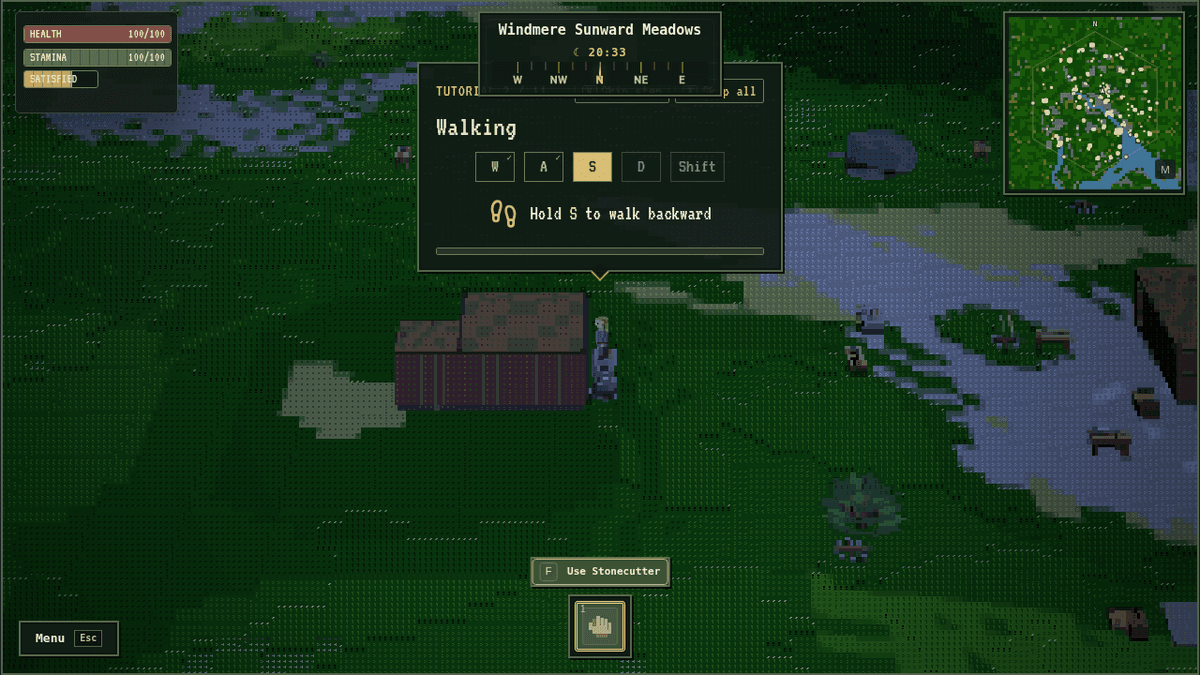 Gameplay capture
We played the first minutes as a guest, saw other players online, and did not gather, craft, build, fight, trade, join a town or sign in with Discord. We did not test a phone, sound or performance on a real graphics card.
Requirements and unknowns
What is Asciilands?
Asciilands is a towny multiplayer sandbox played in the browser, with one shared persistent world and open beta in active development. The world is drawn in text-style glyphs.
The landing page says you can gather, craft and forge, build, inscribe spells and play together. These are the maker's claims, not tested by us.
TabGameHub is unaffiliated. We link to the game's own page with the play button because it cannot be shown inside TabGameHub. The game's page only allows certain sites to frame it, and ours is not among them.
How to start playing
The steps below follow what we saw on October 27, 2026.
- Open the game with the play button on this page.
- Make a character. Enter a name of at least 3 characters and choose body, hair and clothes options.
- On the title screen pick a server. We saw Europe and North America with player counts. Press Play as guest. A popup about keeping your progress asks once more, and you can choose Play as guest again.
- Choose Start together or Start farther away, then press Begin.
- Wait for loading. It took about 30 to 40 seconds on our slow test machine.
- Follow the tutorial. It has 11 steps you can skip or complete.
Controls and menus
These are the defaults shown in the game's own Help tab. Movement keys can be changed in Settings.
We tested walking, camera and opening the menu tabs.
What the first minutes look like
The HUD shows health, stamina and a hunger bar at the top left, the region name, a compass and an in-game clock at the top centre, and a minimap at the top right. The bottom hotbar starts with Hands. The camera looks over a third-person character in a text-glyph rendered landscape.
The tutorial counter shows 11 steps. The prompts we saw were Walking, Camera, Collect some supplies, Make a Plank, Open your Pack, Open Map, Open Build, Open Settings, Choose a goal and Open Help, followed by a Tutorial complete card. We pressed Skip step on most of them, so we did not gather or craft along it.
The Pack shows weight and hotbar slots. When we looked it held Fiber, Stone Chunk and Wood Log at the start. We did not gather them ourselves.
The Crafting tab lists recipes including Plank, Stick, Rope, Bandage and a list of weapon and tool heads at a Forge. We crafted nothing.
The Build tab has categories All, Construction, Stations and Settlement. When we looked Campfire, Stonecutter, Smelter and Camp were available, and Workbench, Loom, foundations, Fence and plots were locked.
The Journal shows Active and Done goals. The Map has Local and World views with a legend. The Town and Social tabs ask guests to sign in. The Help tab has a Field guide with topics covering the start, survival, materials, metal and forging, crafting, building, companions, combat and magic, travel and fishing, towns and friends, trade and gold, and account and settings.
Account, cost and saving
Everything here comes from the maker's FAQ and from the game's own title screen and menus. We did not pay or sign in.
Credits, licences and AI use
The maker's credits page says the rendering technology is derived from Asciicker under the MIT licence and that Asciilands is not an official Asciicker release or endorsed by its authors. Its nature models come from a CC0 pack. The maker states that AI was used heavily to write the code and that some placeholder assets are AI-generated and meant to be replaced later.
Other multiplayer browser games on TabGameHub
Lagos Life is a Sims-style multiplayer life game set in Lagos. Account sign-up is required and you must be 18 or older.
Cork7 is a browser freeski game with solo, multiplayer and ranked 1v1 options.
Friday Fighters is a fan-made 2D fighting game with online room codes.
These are different genres. The link is only that they have multiplayer.
Asciilands questions, answered
Short answers based on the maker's FAQ and our own first minutes as a guest.
What our check covers
TabGameHub opened Asciilands on October 27, 2026 and played the first minutes as a guest. We saw other players online. We did not gather, craft, build, forge, fight, cast spells, fish, trade, join a town, add friends or sign in with Discord. We did not test a phone, sound or performance on a real graphics card.
We did not test wipes or long-term saving. The landing page features are the maker's claims. Player counts and region names were a snapshot.
Our recorded observation
Google Chrome (headless) on Linux, 1280 × 720 window, fresh profile, software rendering, played as a guest with keyboard. · 2026-10-27 · Level: gameplay
- Read the landing page and FAQ on asciilands.io.
- Open the play page and create a character with name, body, hair and clothes options.
- Choose Play as guest and select the Start farther away option on the title screen.
- Wait for loading and walk around in the game, reading tutorial prompts and skipping most tutorial steps.
- Open the Pack, Crafting, Build, Map, Journal, Town, Social, Settings and Help tabs.
Destination observed: https://asciilands.io/play/. Access can change after a check; this is not a live status monitor.
Report a problemGo straight to the source.
- Asciilands — landing page and FAQ Page observed: 2026-10-27
- Asciilands play page — the game itself Page observed: 2026-10-27
- Asciilands credits and licences page Page observed: 2026-10-27