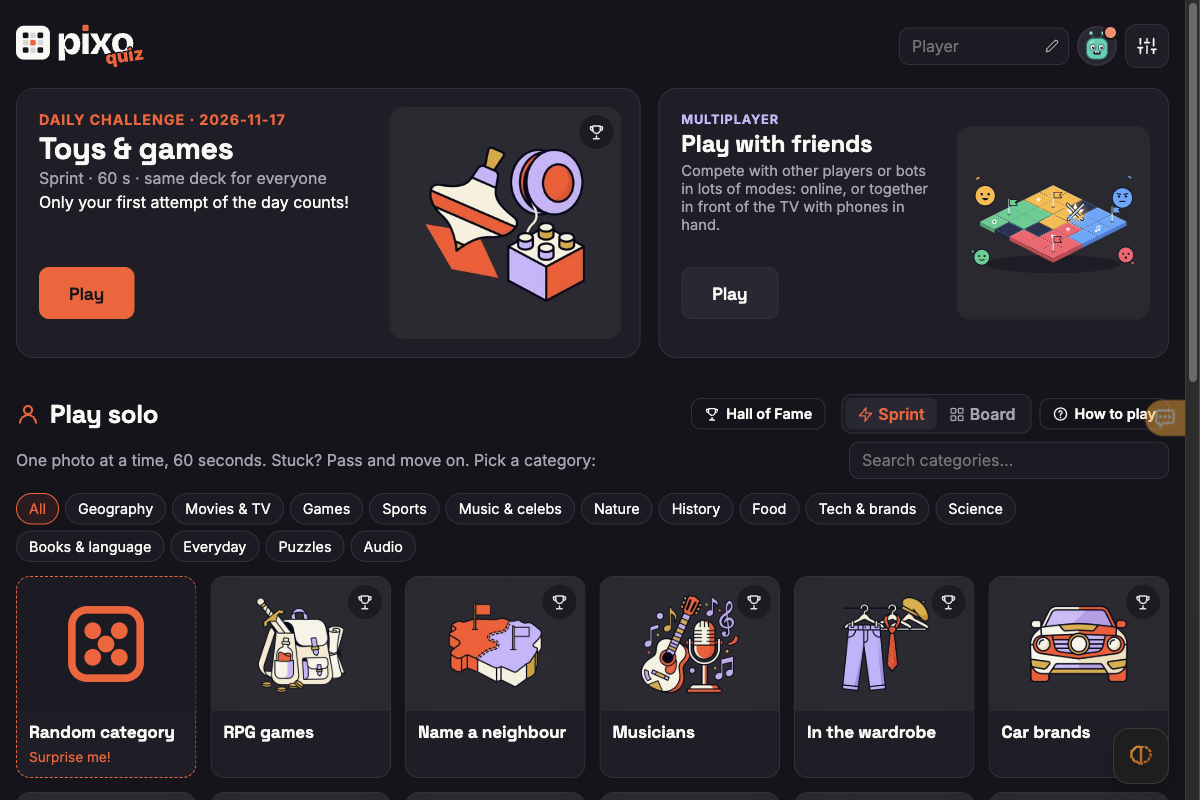
English hub, Sprint rules, Privacy Policy and solo round initialization worked with zero sign-up or payment prompts. Full multi-question photo guessing, voice input, Board mode and online friend rooms were not tested.
Requirements and unknowns
What is PixoQuiz?
PixoQuiz (pixoquiz.com/?lang=en) is a free browser photo trivia game inspired by the territory quiz show The Floor. Whether solo or against friends and bots, you identify flags, capitals, movies, games, car brands, animals and more before the clock runs out.
Opening pixoquiz.com/?lang=en takes you straight to the English lobby with zero downloads, zero registration walls and 159 playable categories.
How to start PixoQuiz in English
TabGameHub inspected pixoquiz.com/?lang=en on November 17, 2026 in desktop Chrome without signing in:
- Open pixoquiz.com/?lang=en (or use the top-right Settings button to change interface language, sound and music).
- Optionally edit your guest display name in the top bar without creating an account.
- Pick Daily Challenge (a shared 60-second Sprint deck where only your first run of the day counts), Play with friends for multiplayer duels/Board battles, or Play solo.
- In Play solo, toggle Sprint (60-second rapid-fire) or Board mode, filter across 14 topic groups (159 categories total) or pick Random category.
- Start typing immediately when each photo appears; hits register automatically without pressing Enter.
Sprint rules, scoring and multiplayer modes
These mechanics come from the PixoQuiz lobby and How to play rules dialog verified on November 17, 2026:
Guest play, rankings and privacy notes
PixoQuiz's Privacy Policy (updated November 15, 2026) confirms that all modes work without signing in. Creating an optional account via Google or Discord stores only an account ID to reserve your nickname on leaderboards and sync records across devices.
Multiplayer room chat stays in memory only and is not saved permanently, though the top 5 global or Daily Challenge nicknames and scores appear publicly on rankings—so avoid using your real full name as a guest nickname.
Related trivia and daily browser games
If you enjoy timed photo, geography and word trivia in a browser tab, try MapTap for 3D globe location guessing, Daily Orbs for four daily mini-puzzles or Krillion for rare-answer trivia.
For more fast solo and friend quizzes, check Noillirk, Eraly and Chainle, or browse Indie and fan-made games.
PixoQuiz questions, answered
Answers verified against the English hub, How to play rules dialog and Privacy Policy at pixoquiz.com/?lang=en during our November 17, 2026 check.
Sources and our check
TabGameHub checked pixoquiz.com/?lang=en on November 17, 2026 in Desktop Chrome 156 on macOS (1200 × 800, no account signed in). We verified the English lobby, Daily Challenge card, multiplayer card, 159-category solo browser, How to play scoring dialog, Privacy Policy and initiated a solo Capital cities Sprint round to the countdown screen.
We did not type answers across a full 60-second Sprint, test voice input, enter a Board territory game, join a multiplayer room or test mobile devices. How we check games explains our menu-level check boundaries.
Our recorded observation
Desktop Chrome 156 on macOS, 1200 × 800 viewport, mouse. No account signed in. · 2026-11-17 · Level: menu
- Open pixoquiz.com/?lang=en as a guest and confirm the English hub with Daily Challenge (2026-11-17), Play with friends multiplayer card, Play solo (Sprint and Board modes), Hall of Fame and 159 categories.
- Open How to play to inspect Sprint scoring (100 pts per hit, +25 pts per streak level, instant typo-tolerant matching, optional voice input button and 3-second pass penalty via Pass or Enter on an empty field).
- Read the Privacy policy (updated November 15, 2026) confirming optional Google/Discord sign-in, guest play and memory-only room chat, then launch Capital cities solo Sprint up to the countdown screen without scoring or completing a round.
Destination observed: https://pixoquiz.com/?lang=en. Access can change after a check; this is not a live status monitor.
Report a problemGo straight to the source.
- PixoQuiz — Online Photo Quiz Game (English) Page observed: 2026-11-17