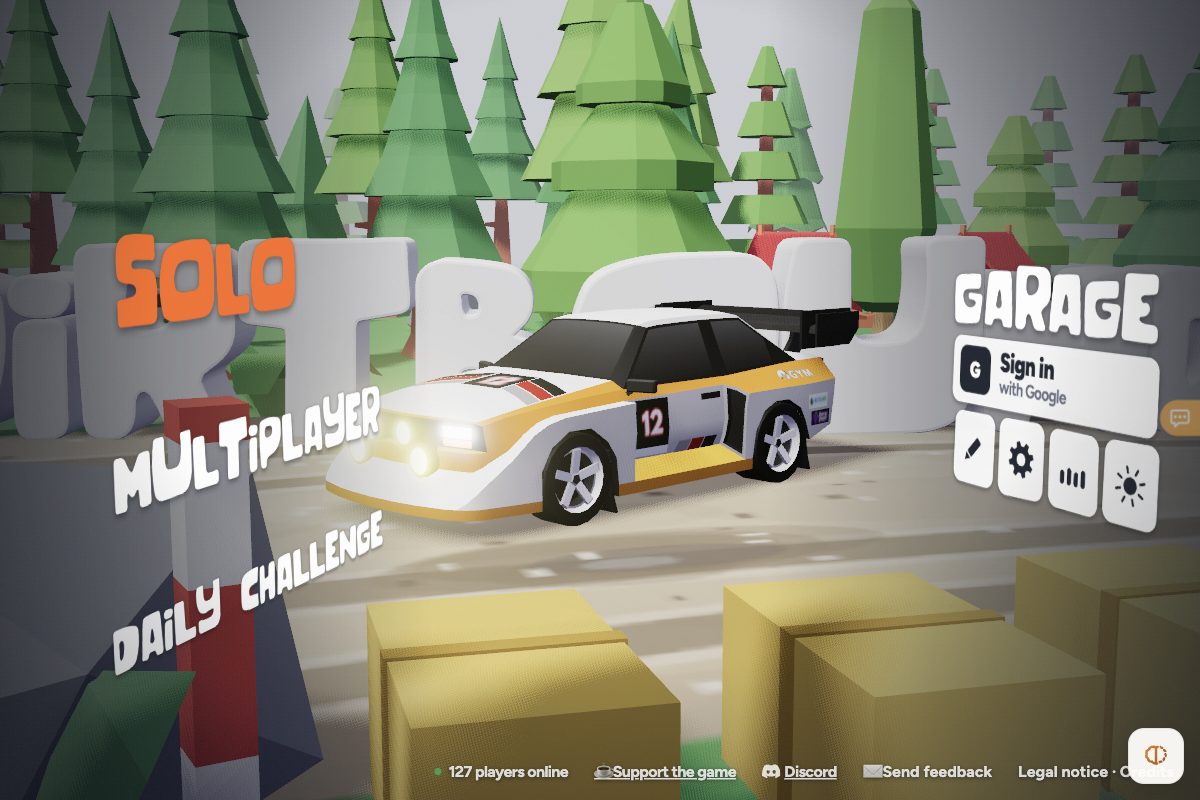
The 3D showroom, Solo sub-menu, graphics presets and complete keyboard/gamepad control settings loaded cleanly as a guest. Live stage driving, Circuit Editor creation and Multiplayer races were not tested past the menus.
Requirements and unknowns
What is DirtBound?
DirtBound (at dirtbound.fr) is a free 3D WebGL rally racing game built in Three.js by Victor Boutros and Luke Baffait. Instead of a static menu, opening the site places you in a pine-forest rally showroom with clickable areas for Solo, Multiplayer, Daily Challenge, Garage, Circuit Editor, Settings and Seasons.
Note that two unrelated projects share similar names online: a separate PC-only dirt-kart game and a motorcycle distance game called Dirtbound Rider. For the browser rally car game, go directly to dirtbound.fr.
How to start DirtBound in your browser
TabGameHub checked dirtbound.fr on November 17, 2026 in desktop Chrome without signing in. Allow a few seconds on initial visit for the 3D showroom models to load:
- Open dirtbound.fr in a desktop browser with WebGL enabled; no installer or account is needed.
- Wait for the white loading canvas to clear into the 3D forest showroom showing rally car #12 and interactive wall labels.
- Select Solo to choose between Circuit (timed laps, leaderboards and ghost cars) or Stage (solo rally), or click Daily challenge for today's ranked run.
- Click the gear icon on the right rack before racing to pick Low, Normal or Ultra graphics and customize your camera or controls.
- Sign in with Google only if you want your times saved to global leaderboards or multiplayer rooms.
Keyboard, gamepad and camera controls
These default controls and camera presets come directly from DirtBound's Settings → Controls screen checked on November 17, 2026 (every keyboard binding can be clicked and remapped):
Modes, graphics presets and language note
In our November 17, 2026 check, the showroom displayed over 100 concurrent players online and offered Solo (Circuit or Stage), Multiplayer (Classic or Experimental with friends), Daily Challenge, Garage (starting with Audi Quattro S1) and a built-in Circuit Editor.
DirtBound selects its interface language automatically from your browser's locale (such as English, French or Chinese) and offers three graphics tiers under Settings: Low (best for older laptops), Normal (default with soft shadows and drift smoke) and Ultra (sunbeams, high-res dirt, animated spectators and depth of field).
Related browser racing and sports games
If you enjoy browser driving and arcade sports, see Need for Speed Underground 2 and our Need for Speed browser hub, or try Cork7 for 3D multiplayer freeskiing.
For more open-road action or quick sports competitions, check Brisbane Streets, PES 6 Web Online and Cricket 07, or browse all Sports & skate games.
DirtBound questions, answered
Answers verified against the live Three.js showroom, Settings, Solo menu and Legal notice at dirtbound.fr during our November 17, 2026 desktop check.
Sources and our check
TabGameHub tested dirtbound.fr on November 17, 2026 in Desktop Chrome 156 on macOS (1200 × 800, guest session, inspected in both Chinese and English browser locales). We confirmed the 3D showroom render, Solo Circuit/Stage sub-menu, Legal notice and Settings → Graphics and Controls.
We did not drive a live rally stage, test the Circuit Editor, join a Multiplayer room or test mobile touch gameplay. How we check games explains our menu-level verification boundaries.
Our recorded observation
Desktop Chrome 156 on macOS, 1200 × 800 viewport, WebGL enabled (verified under both Chinese and en-US browser locales). No account signed in. · 2026-11-17 · Level: menu
- Open dirtbound.fr and wait for the Three.js r185 3D rally showroom to finish rendering car #12 and interactive wall hotspots (Solo, Multiplayer, Daily challenge, Garage, Editor, Settings, Sound, Season).
- Inspect the Legal notice modal confirming creators Victor Boutros and Luke Baffait, Cloudflare routing and free-game status.
- Open Solo to confirm Circuit (timed laps, leaderboards and ghost cars) and Stage rally sub-modes, then open Settings → Graphics and Settings → Controls to verify Low/Normal/Ultra graphics presets, 5 camera views and full keyboard + gamepad bindings.
Destination observed: https://dirtbound.fr/. Access can change after a check; this is not a live status monitor.
Report a problemGo straight to the source.
- DirtBound — Free Browser Rally Racing Game (dirtbound.fr) Page observed: 2026-11-17