Half-Life Web (Pixelsuft): Browser Start & Setup Guide
A Half-Life browser launcher using Xash3D. Start opens a separate setup screen with storage choices and game-data selection; some listed packages carry lag or bug warnings.
By GameHub editorial · Content updated 2026-10-10 · Page checked 2026-10-10
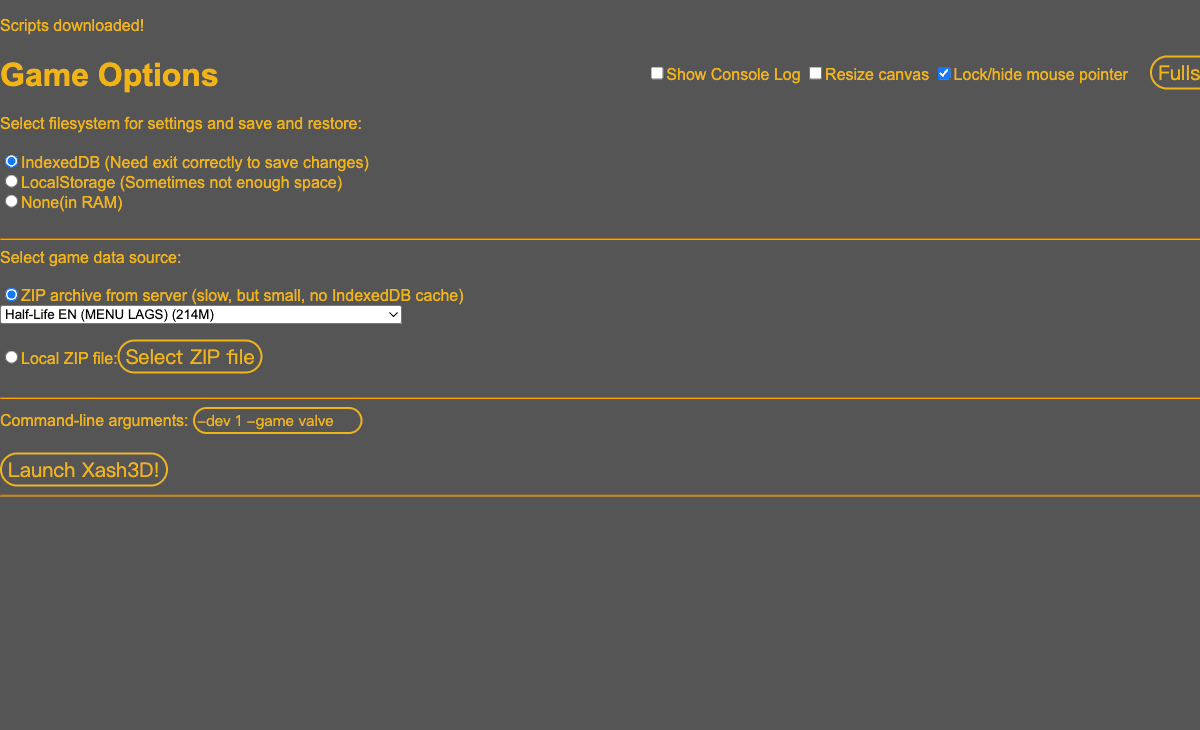 Start page capture
We selected Start and reached /hl/xash.html#150. After scripts loaded, Game Options showed storage choices, server package labels, a Local ZIP file option and Launch Xash3D. No package was launched or save tested.
Requirements and unknowns
What this project is
The Pixelsuft entry is an Xash3D Emscripten launcher. Game-data options and game-engine loading are separate stages.
Where to start
Use the original project link above. The game runs on that site.
- Open the entry page, review Memory size and select Start.
- On Game Options, choose storage and a data source. For your own files, use Local ZIP file with legally obtained compatible data.
- Review the command-line game selection before Launch Xash3D. We stopped at this setup screen.
Before troubleshooting
The setup labels some server packages with MENU LAGS or BUGGED. IndexedDB is described as requiring a correct exit to save changes; persistence was not tested.
Our recorded observation
Desktop Tabbit / Chromium on macOS, 1280 × 800 viewport; entry-page inspection, not a mobile-device test. · 2026-10-10 · Level: page
- Open the original entry and select Start.
- Wait for scripts and inspect the Game Options setup screen; do not supply files or launch a package.
Destination observed: https://pixelsuft.github.io/hl/xash.html#150. Access can change after a check; this is not a live status monitor.
Report a problemGo straight to the source.
- Half-Life Web (Pixelsuft) original project Page observed: 2026-10-10