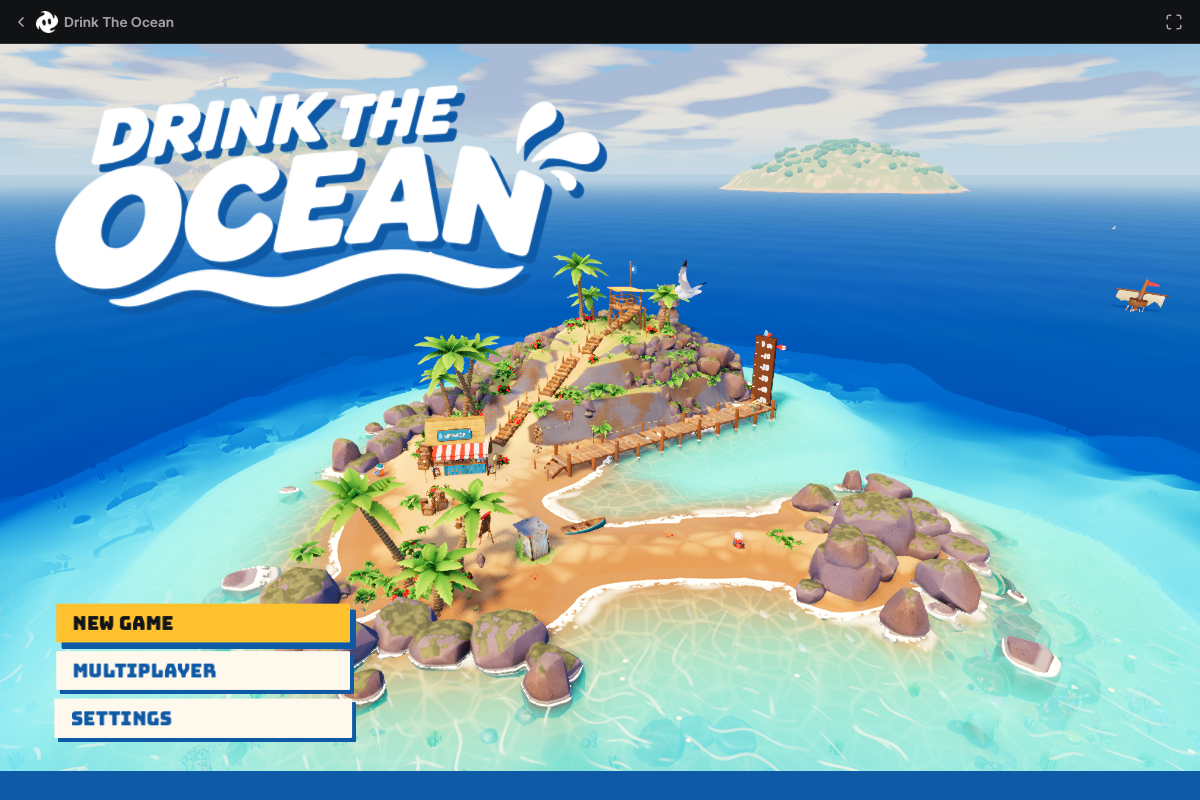
The 3D Godot 4 title scene and main menu rendered in guest mode with no sign-in or download. Because the game runs inside a cross-origin frame on games.mana.gs, first-person movement, straw upgrades and 4-player multiplayer lobbies were not tested past the menu in this automated session.
Requirements and unknowns
What is Drink the Ocean?
Drink the Ocean (styled Drink The Ocean on its official page) is a free first-person incremental browser game for 1–4 players published by Mana at mana.gs/drink-the-ocean. Mana's official premise puts you on a small tropical island with a single absurd goal: sip the entire ocean dry.
Every sip lowers the water level around your island and reveals dry seabed underneath. As the tide drops, you collect uncovered treasures and chests, bring them back to the striped beach SHOP booth, and buy bigger, stronger straws—eventually strong enough to pull a whirlpool—until the ocean recedes far enough to uncover a shipwreck and whatever waits below it.
Is Drink the Ocean on Steam? Official site vs clones
Drink the Ocean is not on Steam. Mana publishes it exclusively as an instant browser game at mana.gs/drink-the-ocean with no Steam store page, Windows executable or paid DLC listed on its site.
Because Mana's hosted Godot 4 runtime checks its origin and displays an error when embedded elsewhere, lookalike domains—including sites with Steam in the URL or copies on aggregator portals—do not run Mana's real 1–4 player build. Several outside copies actually load a completely different clone built around filling a belly and standing under a salt press. To play the genuine straw-and-seabed co-op game, use mana.gs/drink-the-ocean directly. TabGameHub is independent of Mana and links straight there.
How to start Drink the Ocean in your browser
On November 15, 2026, TabGameHub opened the game in desktop Chrome at 1200 × 800 without signing in. Follow these steps to reach the 3D island menu:
- Open mana.gs/drink-the-ocean on a desktop browser with keyboard and mouse.
- Click Play Now—no login, installer or Steam client is required.
- Wait on mana.gs/play/drink-the-ocean while the Godot 4 WebAssembly bundle finishes loading from 0% to 100% into the live 3D island view.
- Pick NEW GAME for a solo island run or MULTIPLAYER for 1–4 player co-op, or check audio and display choices in SETTINGS.
- Use the top-right Fullscreen toggle on Mana's player bar if you want a full-window viewport.
Core loop: straws, seabed treasure and co-op
These mechanics come from Mana's official Drink The Ocean game description and the elements visible on the rendered 3D title island (pier, rowboat, hilltop lookout and beach SHOP booth); TabGameHub verified the menu state rather than playing deep into an upgrade run:
Guest play, local saves and browser requirements
According to Mana's About page, anyone can play as a guest without registering—an optional Mana account only gives you a player name and does not lock core gameplay or features. Mana's Privacy Policy (updated November 14, 2026) notes that guest progress is stored locally in your browser.
Mana specifies Desktop browser and Keyboard and mouse. If the 3D scene stays black or stalls during initial WebAssembly loading, confirm hardware acceleration and WebGL2 are enabled in your desktop browser and give the first asset download a few seconds to complete.
Related indie and multiplayer browser games
If you enjoy offbeat indie concepts and co-op browser worlds with zero downloads, try Asciilands for shared online island building or Cork7 for 3D multiplayer skiing.
For quirky single-player and crew ideas, check 1 in 8 Billion, Lagos Life and PokéSurvivor, or browse all Indie and fan-made guides.
Drink the Ocean questions, answered
Answers verified against mana.gs/drink-the-ocean, mana.gs/play/drink-the-ocean, Mana's About and Privacy pages, and our November 15, 2026 desktop menu check.
Sources and our check
TabGameHub tested mana.gs/drink-the-ocean on November 15, 2026 in desktop Chrome 157 on macOS (1200 × 800, no account signed in). We verified the game specifications, guest-play terms, privacy notes and loaded the live 3D Godot 4 island main menu (NEW GAME, MULTIPLAYER, SETTINGS) at mana.gs/play/drink-the-ocean.
We did not test in-round walking, straw upgrade pacing, saving/reloading mid-run or a live 4-player lobby past the menu because cross-origin frame isolation blocked automated pointer-lock testing. How we check games explains how we separate page, menu and gameplay checks. Drink The Ocean and its artwork are © 2026 Mana.
Our recorded observation
Desktop Chrome 157 on macOS, 1200 × 800 viewport. WebAssembly and WebGL enabled. No account signed in. · 2026-11-15 · Level: menu
- Open mana.gs/drink-the-ocean as a guest. Confirm the official tagline ('Your only job is to drink the entire ocean.'), incremental seabed-treasure and straw-upgrade overview, and specs (Incremental, Co-op, 1–4 players, Keyboard and mouse, Desktop browser), with no Steam link listed.
- Inspect mana.gs/about and mana.gs/privacy (updated November 14, 2026) to confirm guest play requires no account, guest saves use browser local storage, and no ads or paid unlocks gate play.
- Click Play Now to open mana.gs/play/drink-the-ocean and wait for the Godot 4 WebAssembly build (v1.0.3 on games.mana.gs) to finish loading from 0% to 100%.
- Observe the live 3D tropical island scene (beach SHOP booth, pier, rowboat, character on sand, hill lookout tower) and main menu buttons (NEW GAME, MULTIPLAYER, SETTINGS), plus the top Drink The Ocean header and Fullscreen toggle.
Destination observed: https://mana.gs/play/drink-the-ocean. Access can change after a check; this is not a live status monitor.
Report a problemGo straight to the source.
- Drink The Ocean — official game page on Mana Page observed: 2026-11-15
- Play Drink The Ocean — Mana web player and 3D menu Page observed: 2026-11-15
- About Mana — guest play and optional account policy Page observed: 2026-11-15
- Mana Privacy Policy and Terms of Service Page observed: 2026-11-15