Skip to content
TABGAMEHUB EDITORIAL / SOURCED SETUP NOTES

Meowdoku: Cat Sudoku Puzzle in Browser

Play Meowdoku free in your browser at playmeowdoku.com: cat Sudoku + Minesweeper logic, daily boards, tips. Not the Oakever app—rules and FAQ.

By TabGameHub editorial · Content updated 2026-11-04 · Gameplay checked 2026-11-04

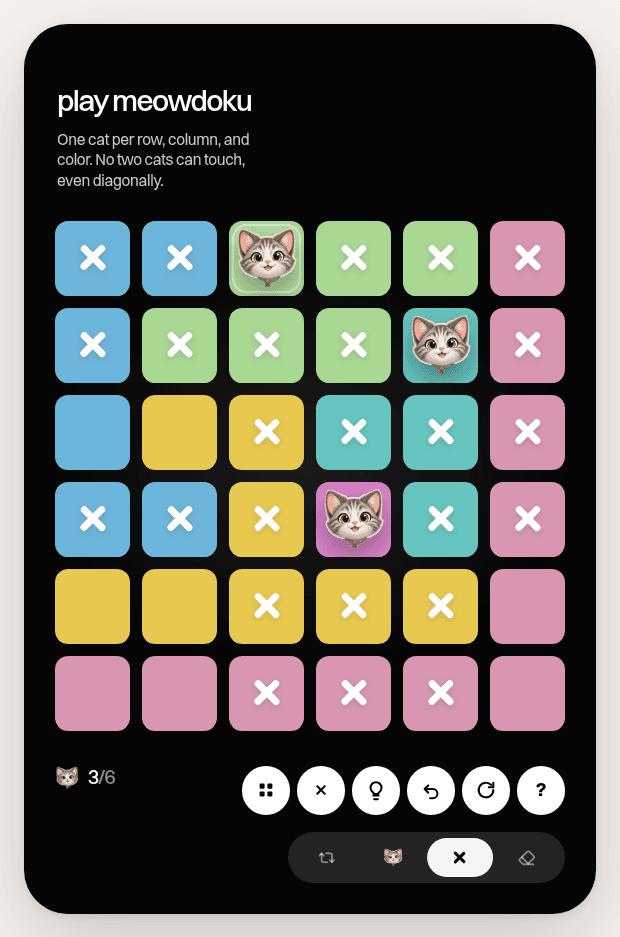
Meowdoku mid-solve 6×6 board at playmeowdoku.com showing independent browser version (not Oakever), captured by TabGameHub 2026-11-04. We host no game files.Gameplay capture
A Meowdoku puzzle mid-solve showing a 6×6 grid with colored regions, cat placement, and X marks for exclusions. This is the independent browser board at playmeowdoku.com, not the official Oakever mobile app. Captured by TabGameHub on November 4, 2026. TabGameHub does not host the game. Original project · 2026-11-04
Latest check: gameplay checked

Reached fully interactive gameplay on both Daily Board and Practice mode. Verified Sudoku constraints, cat placement with Minesweeper exclusion logic, undo/hint functionality, and local save persistence. This is the independent browser version at playmeowdoku.com, distinct from the Oakever mobile app.

Requirements and unknowns

Device / inputDesktop or mobile browser. Tested in desktop Chrome; mobile layout exists.
Original filesNo file picker, no download. Runs in the browser at playmeowdoku.com.
AccountNo account or sign-in required. Progress is saved locally in browser storage.
CostFree browser version. The official Oakever mobile app is a separate product with in-app purchases.

What is Meowdoku?

Meowdoku is a cat-themed Sudoku puzzle that adds Minesweeper logic to the classic number grid. The independent browser version at playmeowdoku.com lets you play daily boards and practice mode free in your tab, with no download or account required.

This is not the official Oakever Meowdoku mobile app available on iOS and Android app stores. The browser version at playmeowdoku.com is a separate, independent implementation with its own UI and features. This page documents the browser version only.

For more logic puzzles in your browser, see Indie browser games. TabGameHub links to playmeowdoku.com and does not host the game.

Official Oakever app vs playmeowdoku.com browser version

There are two different Meowdoku implementations you might encounter:

Official Oakever appMobile app on iOS App Store and Google Play Store. Published by Oakever. Includes in-app purchases, achievements, and mobile-optimized touch controls. This is the original licensed Meowdoku product.
playmeowdoku.com browserIndependent web implementation that runs in any desktop or mobile browser. Free, no account, no app install. This page documents the browser version. We are not affiliated with Oakever.
Which to use?If you prefer native mobile apps with cloud sync and achievements, use the official Oakever app. If you want instant browser access with no install, use playmeowdoku.com.

How to play Meowdoku in your browser

These steps follow playmeowdoku.com as tested on November 4, 2026:

  1. Open playmeowdoku.com in any desktop or mobile browser.
  2. Choose Daily Board for today's puzzle or Practice for a random board.
  3. Click any empty cell and type a number 1-9, following standard Sudoku rules.
  4. Click the cat button and then a cell to place a cat. Adjacent cells automatically get X marks (no cats allowed).
  5. Use the hint button if stuck, or undo to step back.
  6. Complete the board when all cells are filled correctly.

Meowdoku rules: Sudoku meets Minesweeper

Meowdoku combines standard Sudoku constraints with cat placement logic inspired by Minesweeper. The browser version uses a 6×6 board:

Standard Sudoku rulesEach row, column, and box must contain all digits exactly once. The 6×6 board uses digits 1-6. The board starts with some numbers as clues.
Colored regionsThe boxes are subdivided into colored regions. Cats can only go in specific regions based on the puzzle constraints.
Cat placementSome cells must contain a cat icon instead of a number. Number clues indicate how many cats are in adjacent cells (like Minesweeper).
Exclusion logicWhen you place a cat, cells touching it (horizontally, vertically, or diagonally) cannot contain cats and receive X marks automatically.
Solving orderUse Sudoku logic to narrow down numbers, then use number clues to deduce cat positions, then use cat exclusions to place more numbers. Iterate until solved.

Tips for solving Meowdoku puzzles

These strategies help when you're stuck on a Meowdoku board:

Start with standard SudokuFill in obvious numbers using row/column/box elimination before tackling cat placement. This gives you more context clues.
Look for forced catsIf a number clue shows '1' and only one adjacent cell is empty, that cell must be a cat. Mark it immediately.
Use X marks strategicallyBefore placing a cat, visualize which cells would get X marks. This helps avoid creating impossible situations.
Check region colorsCats respect colored region boundaries. Use this as an extra constraint when deducing placements.
Work backwards from cornersCells with few neighbors (corners and edges) have fewer cat placement options, making them easier to solve.
Use the undo button liberallyTry a cat placement, see what exclusions it creates, then undo if it leads to a contradiction. This is faster than mental calculation.
Combine clue typesA cell that's excluded by Sudoku rules AND cat logic is doubly confirmed. Look for these high-confidence moves.

Daily Board vs Practice mode

The browser version at playmeowdoku.com offers two play modes:

Daily BoardOne new puzzle per day, same for all players. Your progress is saved automatically in browser localStorage. Come back later to continue where you left off.
Practice modeGenerates a random board on demand. No daily limit—play as many practice puzzles as you want. Progress also saved locally.
Local save onlyYour progress lives in your browser's storage for that site. Clearing site data, private windows, or switching browsers will reset your progress.
No accountsThe browser version requires no sign-in. This means no cloud sync or cross-device progress. The official Oakever mobile app offers those features.

The official Oakever Meowdoku mobile app

If you prefer a native mobile experience with achievements and cloud sync, the official Meowdoku app by Oakever is available on iOS (App Store) and Android (Google Play). That app includes in-app purchases, leaderboards, and mobile-optimized touch controls. We have not tested the official app. This page documents only the independent browser version at playmeowdoku.com.

Meowdoku vs Queens (Sudoku variant comparison)

Meowdoku's cat placement rules resemble Queens, another Sudoku variant where you place chess queens on the board. Both add a spatial exclusion layer on top of standard Sudoku:

Queens SudokuPlace queens such that no two queens attack each other (same row, column, diagonal, or 3×3 box). Resembles chess queen movement.
MeowdokuPlace cats such that no two cats are adjacent (8-way adjacency like Minesweeper). Uses number clues to indicate cat count in neighboring cells.
Common mechanicBoth turn Sudoku into a placement puzzle with spatial constraints. Meowdoku's Minesweeper clues make the cat logic more explicit.
DifficultyMeowdoku's explicit clues can make it easier for beginners compared to Queens, where you must deduce all constraints from board geometry.

Meowdoku browser not working? Fixes

These fixes address common issues with playmeowdoku.com based on browser behavior:

Page won't load or blank screenCheck your internet connection and try refreshing. The site is lightweight and should load in any modern browser.
Lost progress on Daily BoardProgress is saved in localStorage. If you cleared site data, used a private window, or switched browsers, your progress was reset. Use the same browser to continue.
Can't place cats or numbersClick the cat button first to toggle cat placement mode, then click a cell. For numbers, click the cell directly and type 1-9.
Hint button not workingHints may be limited or contextual. If no hints appear, try solving a few more cells to give the hint system more context.
Mobile layout issuesThe browser version works on mobile but is optimized for desktop. For a full mobile experience, consider the official Oakever app.

Is playmeowdoku.com safe and official?

The browser version at playmeowdoku.com is an independent implementation, not the official Oakever Meowdoku mobile app. We tested it on November 4, 2026 and confirmed it runs entirely in the browser with no account, download, or install. Your puzzle data is stored locally in your browser.

We are not affiliated with playmeowdoku.com or Oakever. TabGameHub links to the site and does not host the game. The official Meowdoku product is the mobile app by Oakever on iOS and Android app stores. For security, always open playmeowdoku.com directly—avoid third-party mirrors or apps claiming to be Meowdoku.

Meowdoku browser FAQ

Common questions about playing Meowdoku in your browser:

Is playmeowdoku.com the official Meowdoku?No. The official Meowdoku is the mobile app by Oakever on iOS and Android. playmeowdoku.com is an independent browser implementation.
Is the browser version free?Yes. playmeowdoku.com is free with no account, no download, and no in-app purchases. The official mobile app has in-app purchases.
Do I need to download anything?No. The browser version runs entirely at playmeowdoku.com with no file picker or app install.
Can I play Meowdoku offline?Not in the browser version—you need an internet connection to load playmeowdoku.com. The official mobile app may support offline play.
How do cats work in Meowdoku?Cats replace certain numbers on the board. Number clues tell you how many cats are in adjacent cells (like Minesweeper). Placing a cat automatically marks adjacent cells with X (no cats allowed).
What's the difference between Daily Board and Practice?Daily Board is one puzzle per day, same for everyone. Practice generates random boards on demand with no daily limit.
Why did I lose my progress?Progress is saved in your browser's localStorage for that site. Clearing site data, private windows, or switching browsers resets progress.
Does playmeowdoku.com have achievements or leaderboards?No. The browser version is minimal: just the puzzle. The official Oakever mobile app includes achievements and leaderboards.
Can I sync progress across devices?No. The browser version saves locally only. For cloud sync, use the official Oakever mobile app.
Did TabGameHub test it?Yes. On November 4, 2026 we played Meowdoku at playmeowdoku.com in desktop Chrome, completed cells on both Daily Board and Practice mode, verified cat placement and exclusion logic, and confirmed local save persistence.

Sources and our check

On November 4, 2026 we opened playmeowdoku.com in desktop Chrome and played multiple Meowdoku puzzles to gameplay completion. We tested Daily Board and Practice mode, verified Sudoku constraints, cat placement with Minesweeper exclusion logic, undo/hint functionality, and confirmed progress saves in localStorage. This is a gameplay-level check of the independent browser version. See how we check games for what each level means.

Information about the official Oakever Meowdoku mobile app comes from the iOS App Store and Google Play Store listings. We have not tested the mobile app. The screenshot shows the playmeowdoku.com browser board mid-solve, captured on November 4, 2026. TabGameHub does not host Meowdoku or any game files.

Our recorded observation

Google Chrome 131 on desktop Linux, 1280x720 window. Tested both Daily Board and Practice mode. · 2026-11-04 · Level: gameplay

  1. Open playmeowdoku.com. The landing page showed Daily Board and Practice mode options with no account or sign-in prompt.
  2. Start Daily Board. A 6×6 Sudoku grid appeared with colored regions (2×3 boxes are subdivided), cat icons in some cells, and number clues.
  3. Test basic gameplay: click a cell and enter a number. The game accepted valid moves and prevented duplicates per Sudoku rules.
  4. Test Minesweeper logic: place a cat in a cell by clicking the cat button. Cells adjacent to the cat automatically received X marks indicating no cats allowed.
  5. Test undo and hints: confirmed undo button works and hint button provides cell suggestions.
  6. Complete several cells and verify the board state persisted after a page refresh (saved in localStorage).
  7. Switch to Practice mode: a new random board appeared with similar gameplay mechanics.

Destination observed: https://playmeowdoku.com/. Access can change after a check; this is not a live status monitor.

Report a problem
SOURCES & OBSERVATION DATES

Go straight to the source.